9  Rigid Body Transformations and SE(3)

9.1 The Special Euclidean Group SE(3)

A rigid body transformation moves an object without deforming it: every distance and angle is preserved. It combines a rotation \(R \in \text{SO}(3)\) with a translation \(\mathbf{t} \in \mathbb{R}^3\) into a single algebraic object. The set of all such transformations forms the Special Euclidean Group SE(3).

\[\text{SE}(3) = \left\{ (R, \mathbf{t}) \mid R \in \text{SO}(3),\; \mathbf{t} \in \mathbb{R}^3 \right\}\]

SE(3) has 6 degrees of freedom: 3 for rotation, 3 for translation.


9.1.1 Why a Group?

A group requires: (1) closure under composition, (2) an identity, (3) an inverse for every element, and (4) associativity. SE(3) satisfies all four.

The composition law for two rigid transforms \((R_1, \mathbf{t}_1)\) and \((R_2, \mathbf{t}_2)\) — meaning “apply \((R_1, \mathbf{t}_1)\) first, then \((R_2, \mathbf{t}_2)\)”:

\[ (R_2, \mathbf{t}_2) \circ (R_1, \mathbf{t}_1) = (R_2 R_1,\; R_2 \mathbf{t}_1 + \mathbf{t}_2) \]

Notice that the translation part is not just \(\mathbf{t}_1 + \mathbf{t}_2\): the first translation gets rotated by \(R_2\) before adding. This is exactly why you cannot treat rotation and translation independently when chaining frames.

import numpy as np

def compose(R1, t1, R2, t2):
    """Compose SE(3) elements: apply (R1,t1) first, then (R2,t2).
    Returns (R_out, t_out) shape (3,3), (3,)."""
    R_out = R2 @ R1                 # shape (3, 3)
    t_out = R2 @ t1 + t2            # shape (3,)
    return R_out, t_out

def Rz(g):
    c, s = np.cos(g), np.sin(g)
    return np.array([[c,-s,0.],[s,c,0.],[0.,0.,1.]])   # shape (3, 3)

# Frame A: rotate 90° about z, then translate +1 along x
R1 = Rz(np.pi/2)
t1 = np.array([1., 0., 0.])   # shape (3,)

# Frame B: rotate 45° about z, then translate +1 along y
R2 = Rz(np.pi/4)
t2 = np.array([0., 1., 0.])   # shape (3,)

R_AB, t_AB = compose(R1, t1, R2, t2)

print("R_composed:")
print(R_AB.round(4))
print(f"\nt_composed = {t_AB.round(4)}")
print(f"\n(t1 + t2 naive = {(t1 + t2).round(4)}) — wrong when rotations differ")
R_composed:
[[-0.7071 -0.7071  0.    ]
 [ 0.7071 -0.7071  0.    ]
 [ 0.      0.      1.    ]]

t_composed = [0.7071 1.7071 0.    ]

(t1 + t2 naive = [1. 1. 0.]) — wrong when rotations differ

9.1.2 Non-Commutativity

Like SO(3), SE(3) is non-commutative: the order of transforms matters.

import numpy as np

def Ry(b):
    c, s = np.cos(b), np.sin(b)
    return np.array([[c,0.,s],[0.,1.,0.],[-s,0.,c]])   # shape (3, 3)

def Rz(g):
    c, s = np.cos(g), np.sin(g)
    return np.array([[c,-s,0.],[s,c,0.],[0.,0.,1.]])   # shape (3, 3)

# T1: rotate 90° about y, translate (1, 0, 0)
R1 = Ry(np.pi/2); t1 = np.array([1., 0., 0.])   # shape (3, 3), (3,)

# T2: rotate 90° about z, translate (0, 1, 0)
R2 = Rz(np.pi/2); t2 = np.array([0., 1., 0.])   # shape (3, 3), (3,)

# T2 ∘ T1: apply T1 first, T2 second
R_21 = R2 @ R1
t_21 = R2 @ t1 + t2

# T1 ∘ T2: apply T2 first, T1 second
R_12 = R1 @ R2
t_12 = R1 @ t2 + t1

print("T2 ∘ T1:")
print(f"  R = {R_21.round(4)}")
print(f"  t = {t_21.round(4)}")

print("\nT1 ∘ T2:")
print(f"  R = {R_12.round(4)}")
print(f"  t = {t_12.round(4)}")

print(f"\nSame result? {np.allclose(R_21, R_12) and np.allclose(t_21, t_12)}")
T2 ∘ T1:
  R = [[ 0. -1.  0.]
 [ 0.  0.  1.]
 [-1.  0.  0.]]
  t = [0. 2. 0.]

T1 ∘ T2:
  R = [[ 0. -0.  1.]
 [ 1.  0.  0.]
 [-0.  1.  0.]]
  t = [1. 1. 0.]

Same result? False

9.1.3 The Group Identity and Inverse

The identity is \((I_3, \mathbf{0})\): no rotation, no translation.

The inverse of \((R, \mathbf{t})\) is:

\[ (R, \mathbf{t})^{-1} = (R^T,\; -R^T \mathbf{t}) \]

This is cheap to compute — no matrix inversion needed.

import numpy as np

def Rz(g):
    c, s = np.cos(g), np.sin(g)
    return np.array([[c,-s,0.],[s,c,0.],[0.,0.,1.]])   # shape (3, 3)

def se3_inv(R, t):
    """Inverse of an SE(3) element.  Returns (R_inv, t_inv)."""
    R_inv = R.T                  # shape (3, 3)
    t_inv = -R.T @ t             # shape (3,)
    return R_inv, t_inv

R = Rz(np.deg2rad(37.))
t = np.array([2., -1., 0.5])   # shape (3,)

R_inv, t_inv = se3_inv(R, t)

# Verify: composing T with T⁻¹ should give identity
R_id = R_inv @ R
t_id = R_inv @ t + t_inv

print(f"R_inv @ R ≈ I?  {np.allclose(R_id, np.eye(3))}")
print(f"t result ≈ 0?   {np.allclose(t_id, np.zeros(3))}")
print(f"\nt_id = {t_id.round(10)}")
R_inv @ R ≈ I?  True
t result ≈ 0?   True

t_id = [0. 0. 0.]

9.1.4 SE(3) vs Naive (R, t) Pairs

Treating rotation and translation as independent objects — e.g., adding translations directly — produces wrong results as soon as you compose more than one transform. The group structure forces you to keep \((R, \mathbf{t})\) together and use the composition law correctly.

The practical tool for this is the 4×4 homogeneous matrix (§9.2), which packages the law automatically so that plain matrix multiplication does the right thing.

9.2 The 4×4 Transformation Matrix

The composition law \((R_2 R_1,\; R_2\mathbf{t}_1 + \mathbf{t}_2)\) is cumbersome to write out each time. The 4×4 homogeneous matrix packages it so that ordinary matrix multiplication handles everything automatically.

\[T = \begin{pmatrix} R & \mathbf{t} \\ \mathbf{0}^T & 1 \end{pmatrix} \in \mathbb{R}^{4 \times 4} \qquad R \in \text{SO}(3),\; \mathbf{t} \in \mathbb{R}^3\]

The bottom row \([\mathbf{0}^T\; 1]\) is always fixed. \(T\) has 12 free numbers but only 6 true degrees of freedom (3 in \(R\), 3 in \(\mathbf{t}\)).


9.2.1 Building a 4×4 Matrix

import numpy as np

def make_T(R, t):
    """Build a 4×4 SE(3) matrix from rotation R (3×3) and translation t (3,).
    Returns shape (4, 4)."""
    T = np.eye(4)           # shape (4, 4)
    T[:3, :3] = R           # top-left block
    T[:3,  3] = t           # top-right column
    return T

def Rz(g):
    c, s = np.cos(g), np.sin(g)
    return np.array([[c,-s,0.],[s,c,0.],[0.,0.,1.]])   # shape (3, 3)

R = Rz(np.deg2rad(45.))
t = np.array([3., 1., 0.])   # shape (3,)

T = make_T(R, t)
print("T =")
print(T.round(4))
print(f"\nBottom row: {T[3, :]}")
T =
[[ 0.7071 -0.7071  0.      3.    ]
 [ 0.7071  0.7071  0.      1.    ]
 [ 0.      0.      1.      0.    ]
 [ 0.      0.      0.      1.    ]]

Bottom row: [0. 0. 0. 1.]

9.2.2 Applying T to a Point

A 3D point \(\mathbf{p}\) is lifted to a homogeneous 4-vector \(\tilde{p} = [p_x, p_y, p_z, 1]^T\). Then:

\[T\tilde{p} = \begin{pmatrix}R\mathbf{p} + \mathbf{t}\\1\end{pmatrix}\]

The \(w = 1\) component tells you it is a point (not a direction vector).

import numpy as np

def make_T(R, t):
    T = np.eye(4); T[:3,:3] = R; T[:3,3] = t
    return T   # shape (4, 4)

def Rz(g):
    c, s = np.cos(g), np.sin(g)
    return np.array([[c,-s,0.],[s,c,0.],[0.,0.,1.]])

R = Rz(np.pi / 2)                  # 90° about z
t = np.array([2., 0., 0.])         # shape (3,)
T = make_T(R, t)                   # shape (4, 4)

p = np.array([1., 0., 0.])         # shape (3,) — point along x
p_h = np.array([1., 0., 0., 1.])   # shape (4,) — homogeneous

p_prime_h = T @ p_h                # shape (4,)
p_prime    = p_prime_h[:3]         # shape (3,)

print(f"Original point p   = {p}")
print(f"Transformed      p' = {p_prime.round(6)}")
print(f"(90° rotation sends x→y, then translate +2 along x)")
Original point p   = [1. 0. 0.]
Transformed      p' = [2. 1. 0.]
(90° rotation sends x→y, then translate +2 along x)

9.2.3 Composing Transforms via Matrix Multiplication

When you stack transforms \(T_1\) then \(T_2\), the combined matrix is simply \(T_2 T_1\):

\[T_2 T_1 = \begin{pmatrix}R_2 R_1 & R_2\mathbf{t}_1 + \mathbf{t}_2 \\ \mathbf{0}^T & 1\end{pmatrix}\]

No special composition formula needed — standard @ gives the right answer.

import numpy as np

def make_T(R, t):
    T = np.eye(4); T[:3,:3] = R; T[:3,3] = t
    return T   # shape (4, 4)

def Rz(g):
    c, s = np.cos(g), np.sin(g)
    return np.array([[c,-s,0.],[s,c,0.],[0.,0.,1.]])

# World → camera (rotate 30°, shift right 1 m)
T_wc = make_T(Rz(np.deg2rad(30.)), np.array([1., 0., 0.]))   # shape (4, 4)

# Camera → sensor (rotate 10° more, no translation)
T_cs = make_T(Rz(np.deg2rad(10.)), np.array([0., 0., 0.]))   # shape (4, 4)

# World → sensor directly
T_ws = T_cs @ T_wc   # shape (4, 4)

# A point in world frame
p_w = np.array([2., 1., 0., 1.])   # shape (4,)

# Option A: chain manually
p_s_chain = T_cs @ (T_wc @ p_w)   # shape (4,)

# Option B: combined matrix
p_s_combined = T_ws @ p_w          # shape (4,)

print("Via chain:   ", p_s_chain[:3].round(6))
print("Via T_ws:    ", p_s_combined[:3].round(6))
print(f"Equal? {np.allclose(p_s_chain, p_s_combined)}")
Via chain:    [1.874109 2.225268 0.      ]
Via T_ws:     [1.874109 2.225268 0.      ]
Equal? True

9.2.4 SE(3) vs GL(4): Not Every 4×4 Matrix Is a Rigid Transform

A general invertible 4×4 matrix can shear, scale, or project. SE(3) matrices have a strict structure: the top-left \(3\times 3\) block must be in SO(3).

import numpy as np

def make_T(R, t):
    T = np.eye(4); T[:3,:3] = R; T[:3,3] = t
    return T

def Rz(g):
    c, s = np.cos(g), np.sin(g)
    return np.array([[c,-s,0.],[s,c,0.],[0.,0.,1.]])

T = make_T(Rz(np.deg2rad(53.)), np.array([-1., 2., 0.5]))   # shape (4, 4)
R = T[:3, :3]   # shape (3, 3)

print(f"det(R)      = {np.linalg.det(R):.8f}  (must be +1)")
print(f"R^T R = I?    {np.allclose(R.T @ R, np.eye(3))}")
print(f"Bottom row:   {T[3, :]}")
print(f"\nAll SE(3) conditions satisfied: {np.allclose(T[3,:],[0,0,0,1])}")
det(R)      = 1.00000000  (must be +1)
R^T R = I?    True
Bottom row:   [0. 0. 0. 1.]

All SE(3) conditions satisfied: True

9.2.5 The 6-DoF Pose: What Each Number Means

Block Shape Content DoF
\(R\) \(3\times 3\) Orientation (SO(3)) 3
\(\mathbf{t}\) \(3\times 1\) Position in metres 3
\(\mathbf{0}^T\) \(1\times 3\) Fixed zeros 0
\(1\) scalar Fixed one 0

Every robot pose, every camera extrinsic, every sensor mounting bracket is encoded in exactly this 4×4 form. Once you internalize it, the entire geometry pipeline reduces to matrix multiplications.

9.3 Inverse and Composition

Two operations dominate almost every robotics and vision pipeline: inverting a transform (going from frame B to frame A given A-to-B) and chaining transforms (going through intermediate frames). Both reduce to closed-form linear algebra — no numerical inversion needed.


9.3.1 Closed-Form Inverse

For \(T = \begin{pmatrix}R & \mathbf{t}\\\mathbf{0}^T & 1\end{pmatrix}\):

\[T^{-1} = \begin{pmatrix}R^T & -R^T\mathbf{t}\\\mathbf{0}^T & 1\end{pmatrix}\]

Why this works: \(R \in \text{SO}(3)\) so \(R^{-1} = R^T\) (free). The translation inverts as \(-R^T\mathbf{t}\) — you must rotate the translation back before negating it. Computing \(T^{-1}\) this way costs 9 multiplications for \(R^T\mathbf{t}\) plus 3 negations, versus \(O(n^3)\) for generic matrix inversion.

import numpy as np

def make_T(R, t):
    T = np.eye(4); T[:3,:3] = R; T[:3,3] = t
    return T   # shape (4, 4)

def T_inv(T):
    """Closed-form inverse of an SE(3) 4×4 matrix.  Returns shape (4, 4)."""
    R = T[:3, :3]          # shape (3, 3)
    t = T[:3,  3]          # shape (3,)
    Ti = np.eye(4)         # shape (4, 4)
    Ti[:3, :3] =  R.T
    Ti[:3,  3] = -R.T @ t
    return Ti

def Rz(g):
    c, s = np.cos(g), np.sin(g)
    return np.array([[c,-s,0.],[s,c,0.],[0.,0.,1.]])

T = make_T(Rz(np.deg2rad(37.)), np.array([2., -1., 0.5]))   # shape (4, 4)

Ti_closed  = T_inv(T)                    # shape (4, 4)
Ti_numpy   = np.linalg.inv(T)            # shape (4, 4) — brute force

print("Closed-form T_inv:")
print(Ti_closed.round(6))
print(f"\nMatches np.linalg.inv? {np.allclose(Ti_closed, Ti_numpy)}")

# Sanity: T @ T_inv = I
product = T @ Ti_closed
print(f"\nT @ T_inv = I?  {np.allclose(product, np.eye(4))}")
Closed-form T_inv:
[[ 0.798636  0.601815  0.       -0.995456]
 [-0.601815  0.798636  0.        2.002266]
 [ 0.        0.        1.       -0.5     ]
 [ 0.        0.        0.        1.      ]]

Matches np.linalg.inv? True

T @ T_inv = I?  True

9.3.2 Chaining Frames: World → Robot → Sensor → Object

A typical robotics stack has a chain of named coordinate frames. Each adjacent pair is linked by one 4×4 matrix. To find any point’s coordinates in any frame, multiply the chain:

\[T_{\text{world}\leftarrow\text{object}} = T_{\text{world}\leftarrow\text{robot}} \; T_{\text{robot}\leftarrow\text{sensor}} \; T_{\text{sensor}\leftarrow\text{object}}\]

import numpy as np

def make_T(R, t):
    T = np.eye(4); T[:3,:3] = R; T[:3,3] = t
    return T   # shape (4, 4)

def Rz(g):
    c, s = np.cos(g), np.sin(g)
    return np.array([[c,-s,0.],[s,c,0.],[0.,0.,1.]])

def Rx(a):
    c, s = np.cos(a), np.sin(a)
    return np.array([[1.,0.,0.],[0.,c,-s],[0.,s,c]])

# Robot base is 2 m to the right of world origin, rotated 90° about z
T_wr = make_T(Rz(np.pi/2), np.array([2., 0., 0.]))              # world ← robot

# Sensor is mounted 0.3 m in front of the robot, tilted 15° down
T_rs = make_T(Rx(np.deg2rad(-15.)), np.array([0.3, 0., 0.5]))   # robot ← sensor

# Object is 1 m in front of the sensor
T_so = make_T(np.eye(3), np.array([1., 0., 0.]))                # sensor ← object

# Object origin in world frame
T_wo = T_wr @ T_rs @ T_so   # shape (4, 4)

print("T_world←object:")
print(T_wo.round(4))
print(f"\nObject origin in world frame: {T_wo[:3, 3].round(4)}")
T_world←object:
[[ 0.     -0.9659 -0.2588  2.    ]
 [ 1.      0.      0.      1.3   ]
 [ 0.     -0.2588  0.9659  0.5   ]
 [ 0.      0.      0.      1.    ]]

Object origin in world frame: [2.  1.3 0.5]

9.3.3 Inverting the Chain: Going Backwards

To transform from world back to sensor, invert the chain. The inverse of a product reverses order and inverts each factor:

\[(T_1 T_2)^{-1} = T_2^{-1} T_1^{-1}\]

import numpy as np

def make_T(R, t):
    T = np.eye(4); T[:3,:3] = R; T[:3,3] = t
    return T

def T_inv(T):
    R = T[:3,:3]; t = T[:3,3]
    Ti = np.eye(4); Ti[:3,:3] = R.T; Ti[:3,3] = -R.T@t
    return Ti   # shape (4, 4)

def Rz(g):
    c, s = np.cos(g), np.sin(g)
    return np.array([[c,-s,0.],[s,c,0.],[0.,0.,1.]])

def Rx(a):
    c, s = np.cos(a), np.sin(a)
    return np.array([[1.,0.,0.],[0.,c,-s],[0.,s,c]])

T_wr = make_T(Rz(np.pi/2), np.array([2., 0., 0.]))
T_rs = make_T(Rx(np.deg2rad(-15.)), np.array([0.3, 0., 0.5]))

# World → sensor
T_sw = T_inv(T_rs) @ T_inv(T_wr)   # shape (4, 4)

# Verify round-trip: (T_wr @ T_rs) @ T_sw = I
T_ws = T_wr @ T_rs
product = T_ws @ T_sw

print("T_sensor←world @ T_world←sensor ≈ I?")
print(f"  {np.allclose(product, np.eye(4))}")
print(f"\nMax absolute error: {np.max(np.abs(product - np.eye(4))):.2e}")
T_sensor←world @ T_world←sensor ≈ I?
  True

Max absolute error: 4.44e-16

9.3.4 Frame Subscript Bookkeeping

A disciplined notation eliminates sign errors. The convention \(T_{AB}\) means “maps coordinates from frame \(B\) to frame \(A\).” Then:

  • \(T_{AB}\, T_{BC} = T_{AC}\) — inner indices cancel like fractions
  • \((T_{AB})^{-1} = T_{BA}\) — subscripts flip
import numpy as np

def make_T(R, t):
    T = np.eye(4); T[:3,:3] = R; T[:3,3] = t
    return T

def T_inv(T):
    R = T[:3,:3]; t = T[:3,3]
    Ti = np.eye(4); Ti[:3,:3] = R.T; Ti[:3,3] = -R.T@t
    return Ti

def Rz(g):
    c, s = np.cos(g), np.sin(g)
    return np.array([[c,-s,0.],[s,c,0.],[0.,0.,1.]])

T_WR = make_T(Rz(np.pi/4), np.array([1., 0., 0.]))   # world ← robot
T_RC = make_T(Rz(np.pi/6), np.array([0., 0.2, 0.]))  # robot ← camera

# world ← camera: indices cancel W←R←C → W←C
T_WC = T_WR @ T_RC   # shape (4, 4)

# camera ← world: inverse flips subscripts
T_CW = T_inv(T_WC)   # shape (4, 4)

print(f"T_WC @ T_CW = I?  {np.allclose(T_WC @ T_CW, np.eye(4))}")

# A point in camera frame, expressed in world frame
p_C = np.array([0.5, 0., 1., 1.])          # shape (4,)
p_W = T_WC @ p_C                            # shape (4,)
p_C_back = T_CW @ p_W                       # shape (4,)
print(f"\nRound-trip p_C == p_C_back?  {np.allclose(p_C, p_C_back)}")
T_WC @ T_CW = I?  True

Round-trip p_C == p_C_back?  True

9.4 Points, Vectors, and Normals Transform Differently

The \(w\) component in a homogeneous coordinate is not cosmetic — it encodes what kind of geometric object you have. Getting it wrong is one of the most common bugs in computer vision and ray-tracing pipelines.

Object \(w\) Transforms by
Point \(\mathbf{p}\) 1 \(T\tilde{p}\) — full rotation + translation
Direction vector \(\mathbf{v}\) 0 \(R\mathbf{v}\) — rotation only
Normal \(\mathbf{n}\) \((R^{-T})\mathbf{n} = R\mathbf{n}\) (rigid only)

9.4.1 Points vs Direction Vectors

A direction vector represents a displacement, not a location. Translating a displacement makes no sense. Setting \(w = 0\) in the homogeneous vector zeroes out the translation column automatically.

import numpy as np

def make_T(R, t):
    T = np.eye(4); T[:3,:3] = R; T[:3,3] = t
    return T   # shape (4, 4)

def Rz(g):
    c, s = np.cos(g), np.sin(g)
    return np.array([[c,-s,0.],[s,c,0.],[0.,0.,1.]])

R = Rz(np.pi / 2)                    # 90° about z
t = np.array([5., 3., 0.])           # large translation
T = make_T(R, t)                     # shape (4, 4)

# A point at (1, 0, 0)
point_h = np.array([1., 0., 0., 1.])  # w=1  shape (4,)

# A direction vector along x
vec_h   = np.array([1., 0., 0., 0.])  # w=0  shape (4,)

p_out = T @ point_h   # shape (4,)
v_out = T @ vec_h     # shape (4,)

print(f"Point (1,0,0) after T:  {p_out[:3].round(4)}  (w={p_out[3]:.0f})")
print(f"Vector(1,0,0) after T:  {v_out[:3].round(4)}  (w={v_out[3]:.0f})")
print()
print("Translation affects the point but NOT the direction vector.")
print(f"  point sees t:   {p_out[:3] - (R @ point_h[:3]).round(4)}")
print(f"  vector ignores t: {v_out[:3] - (R @ vec_h[:3]).round(4)}")
Point (1,0,0) after T:  [5. 4. 0.]  (w=1)
Vector(1,0,0) after T:  [0. 1. 0.]  (w=0)

Translation affects the point but NOT the direction vector.
  point sees t:   [5. 3. 0.]
  vector ignores t: [6.123234e-17 0.000000e+00 0.000000e+00]

9.4.2 Why Normals Are Special

A surface normal \(\mathbf{n}\) is not a direction vector in the usual sense. When the transformation includes scaling or shear (a general matrix \(M\) rather than pure \(R\)), normals must transform by the inverse-transpose:

\[\mathbf{n}' = (M^{-1})^T \mathbf{n} = (M^{-T})\mathbf{n}\]

For pure rotations \(M = R\), \((R^{-1})^T = (R^T)^T = R\), so the distinction disappears. But as soon as you add non-uniform scale — common in 3D graphics — using \(M\) directly produces normals that no longer point away from the surface.

import numpy as np

# Scale matrix: stretch 3x along x, identity along y,z
M = np.diag([3., 1., 1.])   # shape (3, 3)

# Original geometry: a horizontal surface (normal points up)
point_on_surface = np.array([1., 0., 0.])   # shape (3,)
normal_correct   = np.array([0., 1., 0.])   # shape (3,)  — points in y direction

# Wrong: apply M directly to normal
n_wrong = M @ normal_correct   # shape (3,)

# Correct: apply (M^{-1})^T = (M^{-T})
n_correct = np.linalg.inv(M).T @ normal_correct   # shape (3,)

# Transformed surface point
p_prime = M @ point_on_surface   # shape (3,)

print(f"Transformed surface point: {p_prime}")
print(f"\nNormal (wrong — direct M):    {n_wrong}")
print(f"Normal (correct — (M^-T)):    {n_correct}")

# Check orthogonality to transformed tangent
tangent = np.array([1., 0., 0.])   # shape (3,) — tangent along x
t_prime = M @ tangent              # shape (3,)
print(f"\nTransformed tangent: {t_prime}")
print(f"  wrong  n · t': {np.dot(n_wrong,   t_prime):.4f}  (should be 0)")
print(f"  correct n · t': {np.dot(n_correct, t_prime):.4f}  (should be 0)")
Transformed surface point: [3. 0. 0.]

Normal (wrong — direct M):    [0. 1. 0.]
Normal (correct — (M^-T)):    [0. 1. 0.]

Transformed tangent: [3. 0. 0.]
  wrong  n · t': 0.0000  (should be 0)
  correct n · t': 0.0000  (should be 0)

9.4.3 Pure Rotation: All Three Behave Consistently

When \(M = R \in \text{SO}(3)\), the three transform rules collapse to the same thing: multiply by \(R\). The distinction only matters when \(M\) is not a pure rotation.

import numpy as np

def Rx(a):
    c, s = np.cos(a), np.sin(a)
    return np.array([[1.,0.,0.],[0.,c,-s],[0.,s,c]])   # shape (3, 3)

R = Rx(np.deg2rad(40.))   # shape (3, 3)

n = np.array([0., 1., 0.])   # shape (3,) — surface normal

# Three methods for pure R
n_via_R       = R @ n                          # shape (3,)
n_via_inv_T   = np.linalg.inv(R).T @ n        # shape (3,)

print("For pure rotation R:")
print(f"  R @ n          = {n_via_R.round(6)}")
print(f"  (R^-T) @ n     = {n_via_inv_T.round(6)}")
print(f"  Identical?     {np.allclose(n_via_R, n_via_inv_T)}")
print(f"\n  ||R@n|| = {np.linalg.norm(n_via_R):.6f}  (unit normal preserved)")
For pure rotation R:
  R @ n          = [0.       0.766044 0.642788]
  (R^-T) @ n     = [0.       0.766044 0.642788]
  Identical?     True

  ||R@n|| = 1.000000  (unit normal preserved)

9.4.4 The Bug in Practice

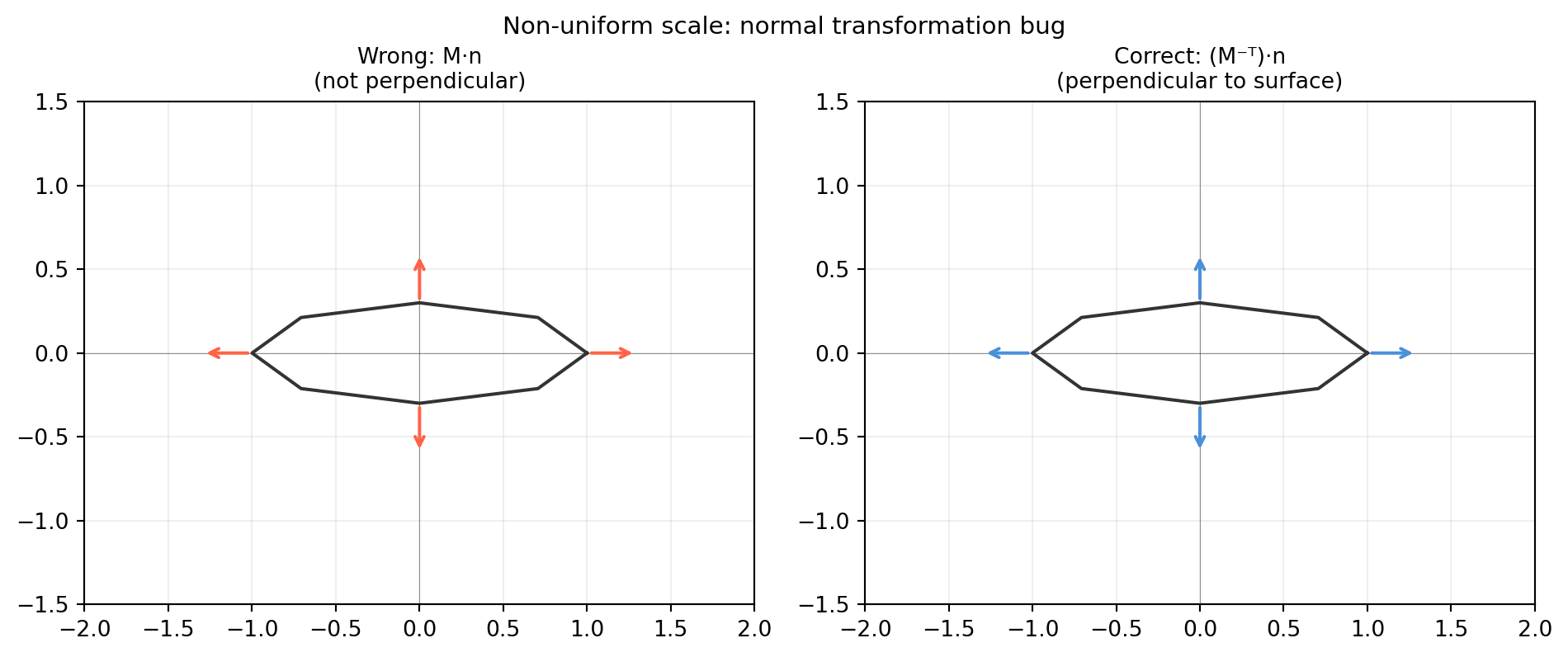
A common mistake in shader code and ray-tracers: the model matrix \(M\) is passed to both vertices (correct) and normals (incorrect when \(M\) contains scale). The visual result is normals that point “into” the surface near stretched geometry, causing wrong lighting.

import numpy as np
import matplotlib.pyplot as plt

# Non-uniform scale: squash y by 0.3
M = np.diag([1., 0.3, 1.])   # shape (3, 3)

# Original rectangle corners and normals
angles = np.linspace(0, 2*np.pi, 9)
pts = np.column_stack([np.cos(angles), np.sin(angles), np.zeros(9)])  # shape (9, 3)
normals = pts.copy()                                                     # shape (9, 3)

# Transform
pts_t  = (M @ pts.T).T                           # shape (9, 3)
n_wrong   = (M @ normals.T).T                    # shape (9, 3) — incorrect
n_correct = (np.linalg.inv(M).T @ normals.T).T  # shape (9, 3) — correct

fig, axes = plt.subplots(1, 2, figsize=(10, 4))
for ax, n_arr, title, col in [
    (axes[0], n_wrong,   'Wrong: M·n\n(not perpendicular)', 'tomato'),
    (axes[1], n_correct, 'Correct: (M⁻ᵀ)·n\n(perpendicular to surface)', '#4a90d9')]:
    ax.plot(pts_t[:, 0], pts_t[:, 1], color='#333333', lw=1.5)
    for i in range(0, len(pts_t)-1, 2):
        p = pts_t[i]; n = n_arr[i] / (np.linalg.norm(n_arr[i]) + 1e-9) * 0.3
        ax.annotate('', xy=p[:2]+n[:2], xytext=p[:2],
                    arrowprops=dict(arrowstyle='->', color=col, lw=1.5))
    ax.set_xlim(-2, 2); ax.set_ylim(-1.5, 1.5)
    ax.set_aspect('equal')
    ax.set_title(title, fontsize=10)
    ax.grid(True, alpha=0.2)
    ax.axhline(0, color='#333333', lw=0.4, alpha=0.5)
    ax.axvline(0, color='#333333', lw=0.4, alpha=0.5)

fig.suptitle('Non-uniform scale: normal transformation bug', fontsize=11)
plt.tight_layout()
plt.show()

9.5 Forward Kinematics as a Product of SE(3) Matrices

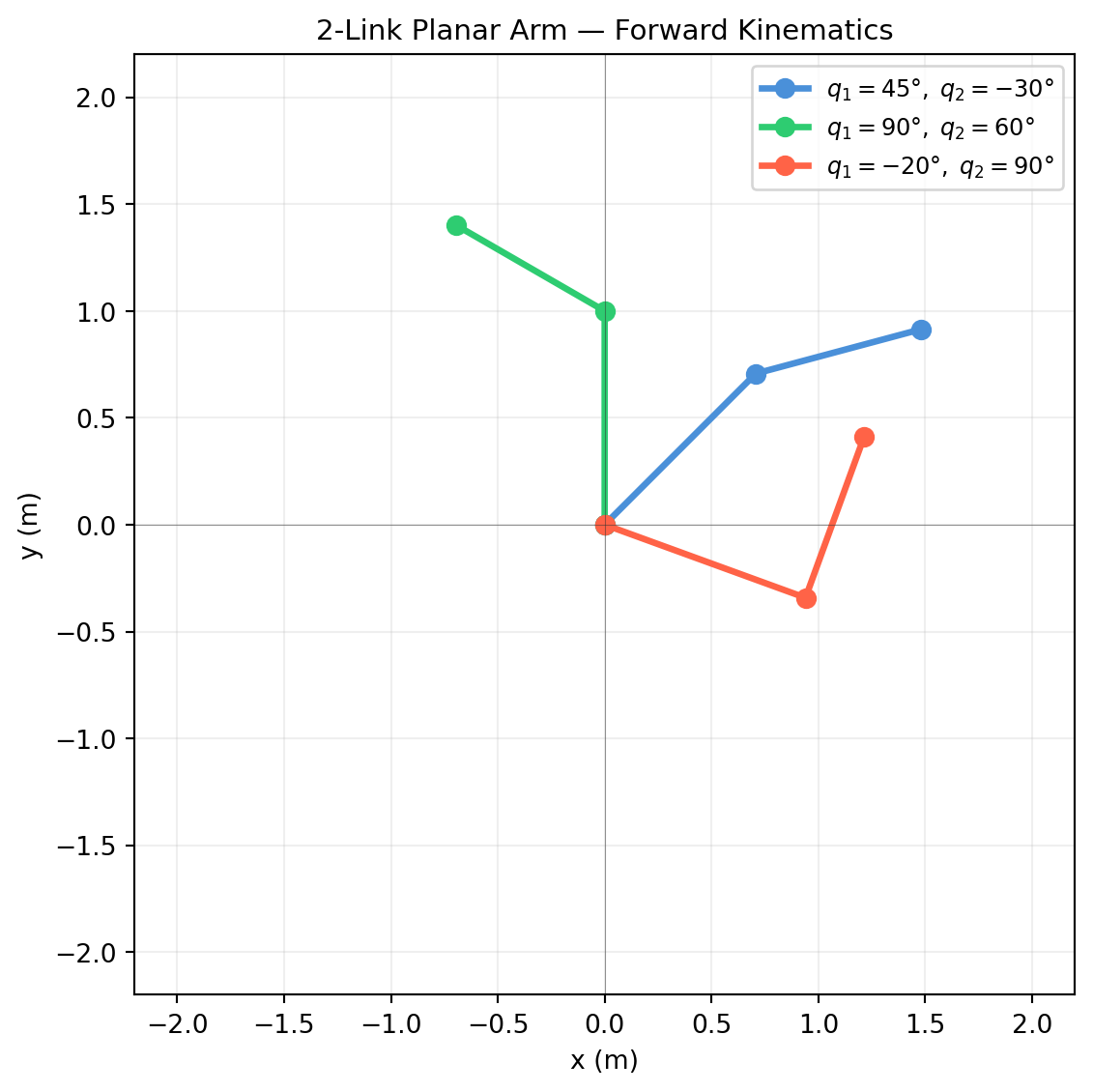
Forward kinematics answers: given joint angles \(\mathbf{q} = (q_1, \ldots, q_n)\), where is the robot’s end-effector in world space? Each joint contributes one 4×4 matrix; the end-effector pose is their product.

\[T_{\text{end}} = T_0 \; T_1(q_1) \; T_2(q_2) \; \cdots \; T_n(q_n)\]

This is nothing more than chaining SE(3) transformations — the same operation we built in §9.3.


9.5.2 Visualising the Arm

import numpy as np
import matplotlib.pyplot as plt

def make_T(R, t):
    T = np.eye(4); T[:3,:3] = R; T[:3,3] = t
    return T

def Rz(g):
    c, s = np.cos(g), np.sin(g)
    return np.array([[c,-s,0.],[s,c,0.],[0.,0.,1.]])

def fk_2link(q1, q2, l1=1.0, l2=0.8):
    T_base  = np.eye(4)
    T_joint1 = make_T(Rz(q1), np.zeros(3))
    T_link1  = make_T(np.eye(3), np.array([l1, 0., 0.]))
    T_joint2 = make_T(Rz(q2), np.zeros(3))
    T_link2  = make_T(np.eye(3), np.array([l2, 0., 0.]))
    T_elbow = T_base @ T_joint1 @ T_link1
    T_end   = T_elbow @ T_joint2 @ T_link2
    return T_base, T_elbow, T_end

configs = [
    (np.deg2rad( 45.), np.deg2rad(-30.), '#4a90d9', r'$q_1=45°,\;q_2=-30°$'),
    (np.deg2rad( 90.), np.deg2rad( 60.), '#2ecc71', r'$q_1=90°,\;q_2=60°$'),
    (np.deg2rad(-20.), np.deg2rad( 90.), 'tomato',  r'$q_1=-20°,\;q_2=90°$'),
]

fig, ax = plt.subplots(figsize=(6, 6))

for q1, q2, col, label in configs:
    T0, T1, T2 = fk_2link(q1, q2)
    p0 = T0[:2, 3]; p1 = T1[:2, 3]; p2 = T2[:2, 3]
    ax.plot([p0[0], p1[0], p2[0]], [p0[1], p1[1], p2[1]],
            '-o', color=col, lw=2.5, ms=7, label=label)

ax.set_xlim(-2.2, 2.2); ax.set_ylim(-2.2, 2.2)
ax.set_aspect('equal')
ax.set_xlabel('x (m)'); ax.set_ylabel('y (m)')
ax.set_title('2-Link Planar Arm — Forward Kinematics', fontsize=11)
ax.legend(fontsize=9)
ax.grid(True, alpha=0.2)
ax.axhline(0, color='#333333', lw=0.4, alpha=0.5)
ax.axvline(0, color='#333333', lw=0.4, alpha=0.5)
plt.tight_layout()
plt.show()


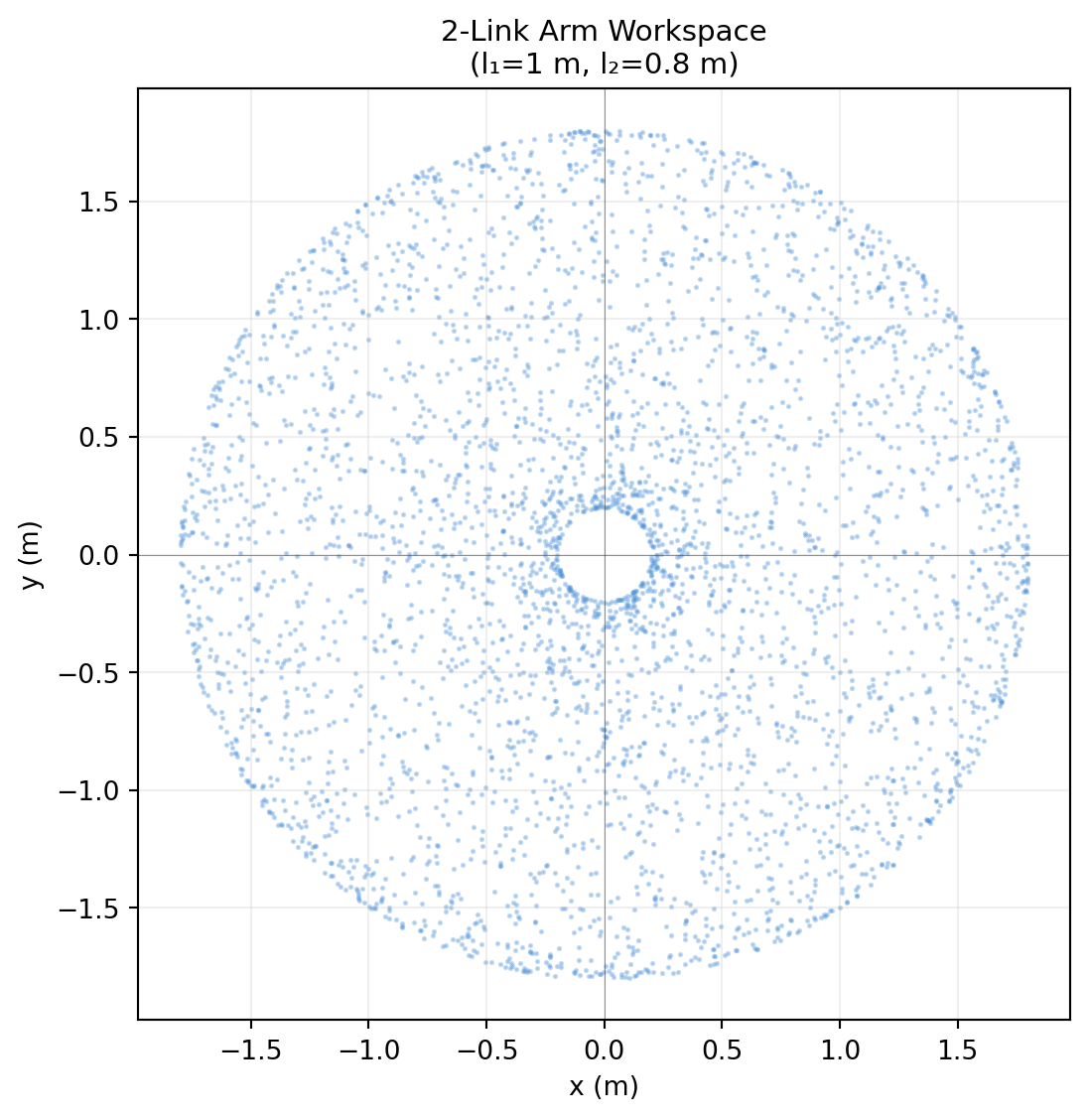
9.5.3 Sweeping the Workspace

The workspace is the set of all reachable end-effector positions. A dense sweep over joint angles reveals it.

import numpy as np
import matplotlib.pyplot as plt

def make_T(R, t):
    T = np.eye(4); T[:3,:3] = R; T[:3,3] = t
    return T

def Rz(g):
    c, s = np.cos(g), np.sin(g)
    return np.array([[c,-s,0.],[s,c,0.],[0.,0.,1.]])

def fk_end(q1, q2, l1=1.0, l2=0.8):
    T1 = make_T(Rz(q1), np.zeros(3)) @ make_T(np.eye(3), np.array([l1,0.,0.]))
    T2 = T1 @ make_T(Rz(q2), np.zeros(3)) @ make_T(np.eye(3), np.array([l2,0.,0.]))
    return T2[:2, 3]   # shape (2,)

rng = np.random.default_rng(42)
n_samples = 4000
q1s = rng.uniform(-np.pi, np.pi, n_samples)   # shape (4000,)
q2s = rng.uniform(-np.pi, np.pi, n_samples)   # shape (4000,)

ends = np.array([fk_end(q1, q2) for q1, q2 in zip(q1s, q2s)])   # shape (4000, 2)

fig, ax = plt.subplots(figsize=(6, 6))
ax.scatter(ends[:, 0], ends[:, 1], s=1, alpha=0.3, color='#4a90d9')
ax.set_aspect('equal')
ax.set_xlabel('x (m)'); ax.set_ylabel('y (m)')
ax.set_title('2-Link Arm Workspace\n(l₁=1 m, l₂=0.8 m)', fontsize=11)
ax.grid(True, alpha=0.2)
ax.axhline(0, color='#333333', lw=0.4, alpha=0.5)
ax.axvline(0, color='#333333', lw=0.4, alpha=0.5)
plt.tight_layout()
plt.show()


9.5.4 Denavit–Hartenberg Convention

For 3D serial manipulators, the Denavit–Hartenberg (DH) convention parameterises each joint-to-joint transform with just four numbers: \((\theta_i, d_i, a_i, \alpha_i)\).

\[T_i = R_z(\theta_i)\; T_z(d_i)\; T_x(a_i)\; R_x(\alpha_i)\]

Parameter Meaning
\(\theta_i\) Joint rotation about \(z\)
\(d_i\) Link offset along \(z\)
\(a_i\) Link length along \(x\)
\(\alpha_i\) Twist angle about \(x\)
import numpy as np

def make_T(R, t):
    T = np.eye(4); T[:3,:3] = R; T[:3,3] = t
    return T

def Rz(g):
    c, s = np.cos(g), np.sin(g)
    return np.array([[c,-s,0.],[s,c,0.],[0.,0.,1.]])

def Rx(a):
    c, s = np.cos(a), np.sin(a)
    return np.array([[1.,0.,0.],[0.,c,-s],[0.,s,c]])

def dh_matrix(theta, d, a, alpha):
    """Standard DH matrix for one joint.  Returns shape (4, 4)."""
    Tz = make_T(np.eye(3), np.array([0., 0., d]))
    Tx = make_T(np.eye(3), np.array([a,  0., 0.]))
    return make_T(Rz(theta), np.zeros(3)) @ Tz @ Tx @ make_T(Rx(alpha), np.zeros(3))

# 2-link planar arm in DH form (alpha=0, d=0)
l1, l2 = 1.0, 0.8
q1, q2 = np.deg2rad(45.), np.deg2rad(-30.)

T1 = dh_matrix(theta=q1, d=0., a=l1, alpha=0.)   # shape (4, 4)
T2 = dh_matrix(theta=q2, d=0., a=l2, alpha=0.)   # shape (4, 4)

T_end = T1 @ T2   # shape (4, 4)

print("End-effector pose via DH matrices:")
print(T_end.round(4))
print(f"\nEnd position: {T_end[:2, 3].round(4)}")
End-effector pose via DH matrices:
[[ 0.9659 -0.2588  0.      1.4798]
 [ 0.2588  0.9659  0.      0.9142]
 [ 0.      0.      1.      0.    ]
 [ 0.      0.      0.      1.    ]]

End position: [1.4798 0.9142]

9.6 Dual Quaternions (Optional)

Note

This section extends the quaternion algebra of §8.4 to handle full SE(3) — rotation and translation — in a single compact object. Skip on first read; come back when you encounter ROS 2’s tf2 dual-quaternion interpolation or Isaac Sim’s rigid body motion API.

A dual quaternion \(\hat{q}\) is a pair of quaternions \((q_r, q_d)\) over the dual numbers \(\mathbb{D} = \{a + \epsilon b \mid \epsilon^2 = 0\}\):

\[\hat{q} = q_r + \epsilon q_d\]

  • \(q_r\) (the real part) encodes rotation — exactly a unit quaternion from §8.4.
  • \(q_d\) (the dual part) encodes translation combined with the rotation.

For a rigid body at rotation \(q_r\) and translation \(\mathbf{t}\):

\[q_d = \tfrac{1}{2}\,[0, \mathbf{t}]\; q_r\]

where \([0, \mathbf{t}]\) is a pure quaternion.


9.6.1 Building a Dual Quaternion

import numpy as np

def quat_mul(p, q):
    """Hamilton product [w,x,y,z].  Returns shape (4,)."""
    pw, px, py, pz = p; qw, qx, qy, qz = q
    return np.array([
        pw*qw - px*qx - py*qy - pz*qz,
        pw*qx + px*qw + py*qz - pz*qy,
        pw*qy - px*qz + py*qw + pz*qx,
        pw*qz + px*qy - py*qx + pz*qw
    ])   # shape (4,)

def axis_angle_to_quat(k_hat, theta):
    w = np.cos(theta / 2.)
    v = np.sin(theta / 2.) * k_hat
    return np.array([w, v[0], v[1], v[2]])   # shape (4,)

def make_dq(qr, t):
    """Dual quaternion from unit quaternion qr and translation t (3,).
    Returns (qr, qd) each shape (4,)."""
    t_pure = np.array([0., t[0], t[1], t[2]])   # shape (4,)
    qd = 0.5 * quat_mul(t_pure, qr)             # shape (4,)
    return qr, qd

# 90° about z, then translate (1, 2, 0)
qr = axis_angle_to_quat(np.array([0.,0.,1.]), np.pi/2)   # shape (4,)
t  = np.array([1., 2., 0.])                               # shape (3,)

qr_dq, qd_dq = make_dq(qr, t)
print(f"qr = {qr_dq.round(6)}")
print(f"qd = {qd_dq.round(6)}")
print(f"\n||qr|| = {np.linalg.norm(qr_dq):.6f}  (must be 1)")
print(f"qr · qd = {np.dot(qr_dq, qd_dq):.6f}  (must be 0 — orthogonality constraint)")
qr = [0.707107 0.       0.       0.707107]
qd = [0.       1.06066  0.353553 0.      ]

||qr|| = 1.000000  (must be 1)
qr · qd = 0.000000  (must be 0 — orthogonality constraint)

9.6.2 Dual Quaternion Multiplication

Composition of two SE(3) transforms via dual quaternion multiplication:

\[\hat{p} \otimes \hat{q} = p_r q_r + \epsilon\,(p_r q_d + p_d q_r)\]

import numpy as np

def quat_mul(p, q):
    pw, px, py, pz = p; qw, qx, qy, qz = q
    return np.array([pw*qw-px*qx-py*qy-pz*qz,
                     pw*qx+px*qw+py*qz-pz*qy,
                     pw*qy-px*qz+py*qw+pz*qx,
                     pw*qz+px*qy-py*qx+pz*qw])

def axis_angle_to_quat(k_hat, theta):
    w = np.cos(theta/2.); v = np.sin(theta/2.)*k_hat
    return np.array([w,v[0],v[1],v[2]])

def make_dq(qr, t):
    qd = 0.5 * quat_mul(np.array([0.,t[0],t[1],t[2]]), qr)
    return qr, qd   # each shape (4,)

def dq_mul(p_r, p_d, q_r, q_d):
    """Dual quaternion product (pr + ε pd)(qr + ε qd)."""
    r_out = quat_mul(p_r, q_r)                              # shape (4,)
    d_out = quat_mul(p_r, q_d) + quat_mul(p_d, q_r)        # shape (4,)
    return r_out, d_out

def dq_to_t(qr, qd):
    """Extract translation from dual quaternion."""
    qr_conj = np.array([qr[0], -qr[1], -qr[2], -qr[3]])   # shape (4,)
    t_pure  = 2. * quat_mul(qd, qr_conj)                   # shape (4,)
    return t_pure[1:]   # shape (3,)

# Transform 1: 45° about z, translate (1,0,0)
qr1, qd1 = make_dq(axis_angle_to_quat(np.array([0.,0.,1.]), np.pi/4),
                    np.array([1., 0., 0.]))

# Transform 2: 45° more about z, translate (0,1,0)
qr2, qd2 = make_dq(axis_angle_to_quat(np.array([0.,0.,1.]), np.pi/4),
                    np.array([0., 1., 0.]))

# Compose: apply T1 first, then T2
qr_c, qd_c = dq_mul(qr2, qd2, qr1, qd1)

print(f"Combined rotation (qr): {qr_c.round(6)}")
print(f"Combined translation:   {dq_to_t(qr_c, qd_c).round(6)}")

# Compare with 4×4 matrix composition
def make_T(R, t):
    T = np.eye(4); T[:3,:3]=R; T[:3,3]=t; return T
def quat_to_mat(q):
    w,x,y,z = q/np.linalg.norm(q)
    return np.array([[1-2*(y*y+z*z),2*(x*y-w*z),2*(x*z+w*y)],
                     [2*(x*y+w*z),1-2*(x*x+z*z),2*(y*z-w*x)],
                     [2*(x*z-w*y),2*(y*z+w*x),1-2*(x*x+y*y)]])

T1 = make_T(quat_to_mat(qr1), dq_to_t(qr1, qd1))
T2 = make_T(quat_to_mat(qr2), dq_to_t(qr2, qd2))
T_c = T2 @ T1

print(f"\n4×4 translation: {T_c[:3,3].round(6)}")
print(f"Match: {np.allclose(dq_to_t(qr_c, qd_c), T_c[:3,3])}")
Combined rotation (qr): [0.707107 0.       0.       0.707107]
Combined translation:   [0.707107 1.707107 0.      ]

4×4 translation: [0.707107 1.707107 0.      ]
Match: True

9.6.3 ScLERP: Screw-Linear Interpolation

The dual quaternion analogue of SLERP is ScLERP (Screw-Linear Interpolation). It interpolates along a screw axis — simultaneously rotating and translating — producing smoother motion than separate SLERP on rotation and lerp on translation.

import numpy as np

def quat_mul(p, q):
    pw,px,py,pz=p; qw,qx,qy,qz=q
    return np.array([pw*qw-px*qx-py*qy-pz*qz,
                     pw*qx+px*qw+py*qz-pz*qy,
                     pw*qy-px*qz+py*qw+pz*qx,
                     pw*qz+px*qy-py*qx+pz*qw])

def axis_angle_to_quat(k, th):
    return np.array([np.cos(th/2.), *(np.sin(th/2.)*k)])

def make_dq(qr, t):
    qd = 0.5*quat_mul(np.array([0.,t[0],t[1],t[2]]), qr)
    return qr, qd

def dq_to_t(qr, qd):
    qrc = np.array([qr[0],-qr[1],-qr[2],-qr[3]])
    return (2.*quat_mul(qd,qrc))[1:]

def slerp_quat(q0, q1, t):
    q0 = q0/np.linalg.norm(q0); q1 = q1/np.linalg.norm(q1)
    dot = np.clip(np.dot(q0,q1),-1.,1.)
    if dot<0.: q1=-q1; dot=-dot
    Om = np.arccos(dot)
    if Om<1e-8:
        q=(1-t)*q0+t*q1; return q/np.linalg.norm(q)
    return np.sin((1-t)*Om)/np.sin(Om)*q0 + np.sin(t*Om)/np.sin(Om)*q1

def sclerp(dq0, dq1, t):
    """ScLERP between two dual quaternions at parameter t."""
    qr0,qd0 = dq0; qr1,qd1 = dq1
    # SLERP on real part
    qr_t = slerp_quat(qr0, qr1, t)   # shape (4,)
    # Lerp on dual part (approximate; exact ScLERP needs dual-number SLERP)
    qd_t = (1-t)*qd0 + t*qd1         # shape (4,)
    # Re-normalise
    nrm = np.linalg.norm(qr_t)
    return qr_t/nrm, qd_t/nrm

# Pose A: identity
qr_A, qd_A = make_dq(np.array([1.,0.,0.,0.]), np.array([0.,0.,0.]))
# Pose B: 90° about z + translate (2,1,0)
qr_B, qd_B = make_dq(axis_angle_to_quat(np.array([0.,0.,1.]),np.pi/2),
                      np.array([2.,1.,0.]))

ts = np.linspace(0.,1.,6)
print(f"{'t':>4}  {'position':>30}  {'||qr||':>8}")
for t in ts:
    qr_t, qd_t = sclerp((qr_A,qd_A),(qr_B,qd_B),t)
    pos = dq_to_t(qr_t,qd_t)
    print(f"{t:4.1f}  {str(pos.round(4)):>30}  {np.linalg.norm(qr_t):.6f}")
   t                        position    ||qr||
 0.0                      [0. 0. 0.]  1.000000
 0.2       [ 0.4412 -0.0733  0.    ]  1.000000
 0.4       [ 0.8944 -0.0068  0.    ]  1.000000
 0.6          [1.3267 0.1998 0.    ]  1.000000
 0.8          [1.7054 0.5399 0.    ]  1.000000
 1.0                      [2. 1. 0.]  1.000000

9.6.4 When to Use Dual Quaternions

Use case Best tool
Pure rotation interpolation SLERP on unit quaternion (§8.5)
SE(3) pose interpolation ScLERP on dual quaternion
Efficient pose composition 4×4 matrix (§9.2) or dual quaternion
Skinning / blend shapes (graphics) Dual quaternion — avoids “candy wrapper” artefact
ROS 2 tf2 pose stamped geometry_msgs/TransformStamped uses quaternion + vector; dual quaternion under the hood in some planners

9.7 Application: Transforming a Point Cloud to World Frame

A depth camera (e.g. Intel RealSense D435i) produces a 2D array of pixel depth values. To use that data in a world-frame map — for path planning, object detection, or 3D reconstruction — you need two steps:

  1. Lift each pixel \((u, v, d)\) from image coordinates to 3D camera coordinates using the camera’s intrinsic parameters.
  2. Transform from camera frame to world frame using the 4×4 extrinsic matrix \(T_{\text{WC}}\).

Both steps are exactly the SE(3) machinery from §9.2–9.3.


9.7.1 Step 1: Pixel → Camera-Frame 3D Point

Given intrinsics \((f_x, f_y, c_x, c_y)\) and a depth value \(d\) (in metres):

\[\mathbf{p}_C = \begin{pmatrix}(u - c_x)\,d / f_x \\ (v - c_y)\,d / f_y \\ d\end{pmatrix}\]

import numpy as np

def pixel_to_camera(u, v, d, fx, fy, cx, cy):
    """Lift a pixel at (u,v) with depth d to 3D camera-frame point.
    Returns shape (3,)."""
    x = (u - cx) * d / fx
    y = (v - cy) * d / fy
    z = d
    return np.array([x, y, z])   # shape (3,)

# RealSense D435i typical intrinsics at 640×480
fx, fy = 615.0, 615.0
cx, cy = 320.0, 240.0

# Three sample pixels with varying depth
pixels = [(320, 240, 1.5),   # image centre, 1.5 m
          (400, 200, 2.0),   # offset right and up, 2 m
          (100, 350, 0.8)]   # left and down, 0.8 m

print(f"{'u':>5} {'v':>5} {'d':>5}  {'Camera-frame 3D point':>35}")
for u, v, d in pixels:
    p = pixel_to_camera(u, v, d, fx, fy, cx, cy)
    print(f"{u:>5} {v:>5} {d:>5.1f}  {str(p.round(4)):>35}")
    u     v     d                Camera-frame 3D point
  320   240   1.5                        [0.  0.  1.5]
  400   200   2.0            [ 0.2602 -0.1301  2.    ]
  100   350   0.8            [-0.2862  0.1431  0.8   ]

9.7.2 Step 2: Camera → World Frame

Given the extrinsic matrix \(T_{\text{WC}}\) (world ← camera):

import numpy as np

def make_T(R, t):
    T = np.eye(4); T[:3,:3] = R; T[:3,3] = t
    return T   # shape (4, 4)

def Rz(g):
    c, s = np.cos(g), np.sin(g)
    return np.array([[c,-s,0.],[s,c,0.],[0.,0.,1.]])

def Rx(a):
    c, s = np.cos(a), np.sin(a)
    return np.array([[1.,0.,0.],[0.,c,-s],[0.,s,c]])

# Camera is 1.5 m above ground, tilted 20° downward, facing +x
R_WC = Rz(0.) @ Rx(np.deg2rad(-20.))         # shape (3, 3)
t_WC = np.array([0., 0., 1.5])               # shape (3,)
T_WC = make_T(R_WC, t_WC)                    # shape (4, 4)

# A set of camera-frame points
pts_C = np.array([
    [0.,    0.,   1.5],
    [0.2,  -0.1,  2.0],
    [-0.3,  0.1,  1.0],
])   # shape (3, 3)

# Lift to homogeneous, transform, recover 3D
pts_C_h = np.column_stack([pts_C, np.ones(len(pts_C))])   # shape (3, 4)
pts_W_h = (T_WC @ pts_C_h.T).T                            # shape (3, 4)
pts_W   = pts_W_h[:, :3]                                  # shape (3, 3)

print("Camera-frame points:")
print(pts_C.round(4))
print("\nWorld-frame points after T_WC:")
print(pts_W.round(4))
Camera-frame points:
[[ 0.   0.   1.5]
 [ 0.2 -0.1  2. ]
 [-0.3  0.1  1. ]]

World-frame points after T_WC:
[[ 0.      0.513   2.9095]
 [ 0.2     0.5901  3.4136]
 [-0.3     0.436   2.4055]]

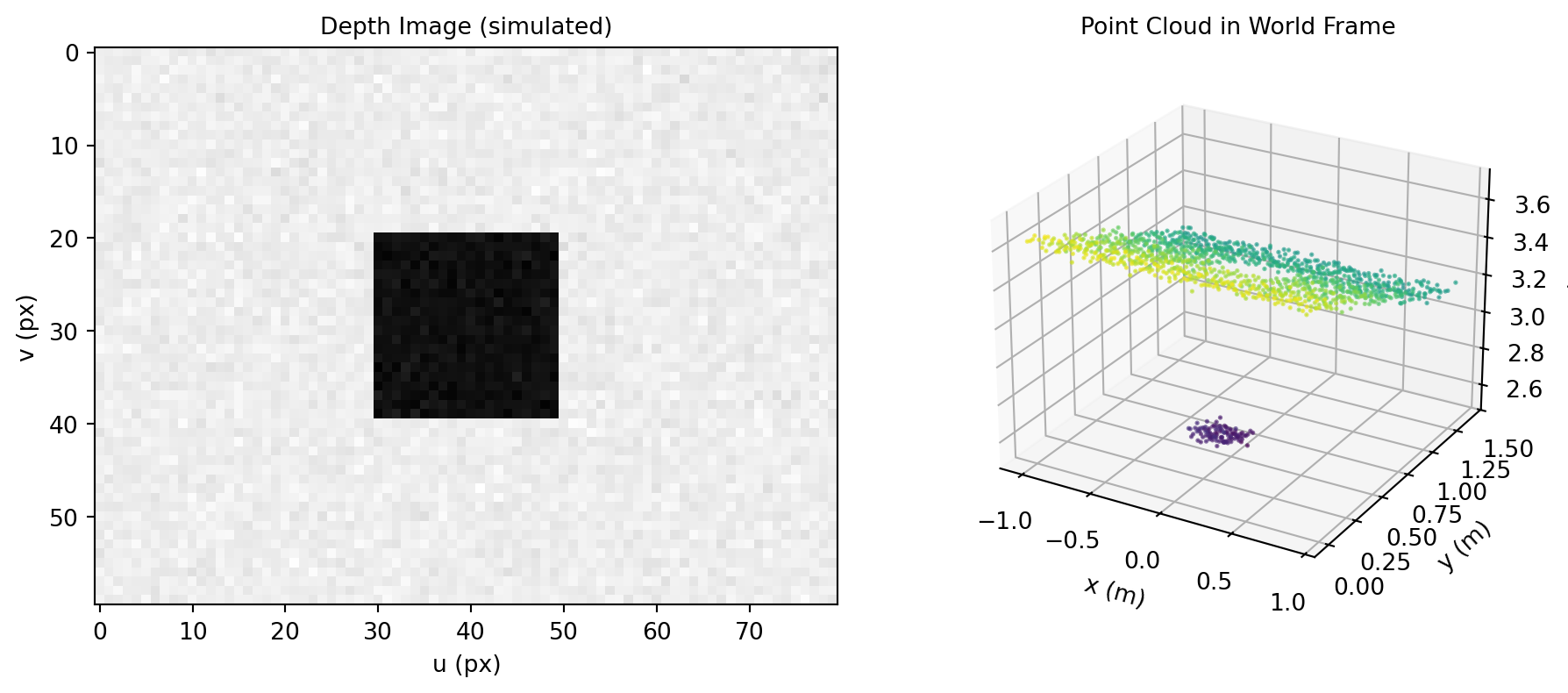
9.7.3 Synthetic Point Cloud from a Depth Image

import numpy as np
import matplotlib.pyplot as plt

rng = np.random.default_rng(0)

# Simulated scene: flat floor at z=1.5 m (camera frame) plus some boxes
W, H = 80, 60
u_grid, v_grid = np.meshgrid(np.arange(W), np.arange(H))   # shape (60, 80)

# Depth: floor plane with slight noise + a box in the centre
depth = np.full((H, W), 2.0)                                    # shape (60, 80)
depth[20:40, 30:50] = 1.2                                        # box region
depth += rng.normal(0, 0.02, (H, W))                             # sensor noise

# Intrinsics (scaled for small image)
fx = fy = 80.; cx = W/2; cy = H/2

# Lift all pixels to camera-frame 3D
u_flat = u_grid.ravel().astype(float)   # shape (4800,)
v_flat = v_grid.ravel().astype(float)   # shape (4800,)
d_flat = depth.ravel()                  # shape (4800,)

x_C = (u_flat - cx) * d_flat / fx   # shape (4800,)
y_C = (v_flat - cy) * d_flat / fy   # shape (4800,)
z_C = d_flat                         # shape (4800,)
pts_C = np.column_stack([x_C, y_C, z_C])   # shape (4800, 3)

# Extrinsic: camera 1.5 m above ground, tilted 20° down
def make_T(R, t):
    T = np.eye(4); T[:3,:3] = R; T[:3,3] = t; return T
def Rx(a):
    c,s=np.cos(a),np.sin(a)
    return np.array([[1.,0.,0.],[0.,c,-s],[0.,s,c]])

T_WC = make_T(Rx(np.deg2rad(-20.)), np.array([0., 0., 1.5]))   # shape (4, 4)

pts_C_h = np.column_stack([pts_C, np.ones(len(pts_C))])   # shape (4800, 4)
pts_W   = (T_WC @ pts_C_h.T).T[:, :3]                    # shape (4800, 3)

# Colour by height in world frame
z_vals = pts_W[:, 2]   # shape (4800,)
z_norm = (z_vals - z_vals.min()) / (z_vals.max() - z_vals.min() + 1e-9)

fig = plt.figure(figsize=(10, 4))

ax1 = fig.add_subplot(121)
ax1.imshow(depth, cmap='gray', origin='upper')
ax1.set_title('Depth Image (simulated)', fontsize=10)
ax1.set_xlabel('u (px)'); ax1.set_ylabel('v (px)')

ax2 = fig.add_subplot(122, projection='3d')
sc = ax2.scatter(pts_W[::4, 0], pts_W[::4, 1], pts_W[::4, 2],
                 c=z_norm[::4], cmap='viridis', s=1, alpha=0.6)
ax2.set_xlabel('x (m)'); ax2.set_ylabel('y (m)'); ax2.set_zlabel('z (m)')
ax2.set_title('Point Cloud in World Frame', fontsize=10)
ax2.view_init(elev=25, azim=-60)

plt.tight_layout()
plt.show()


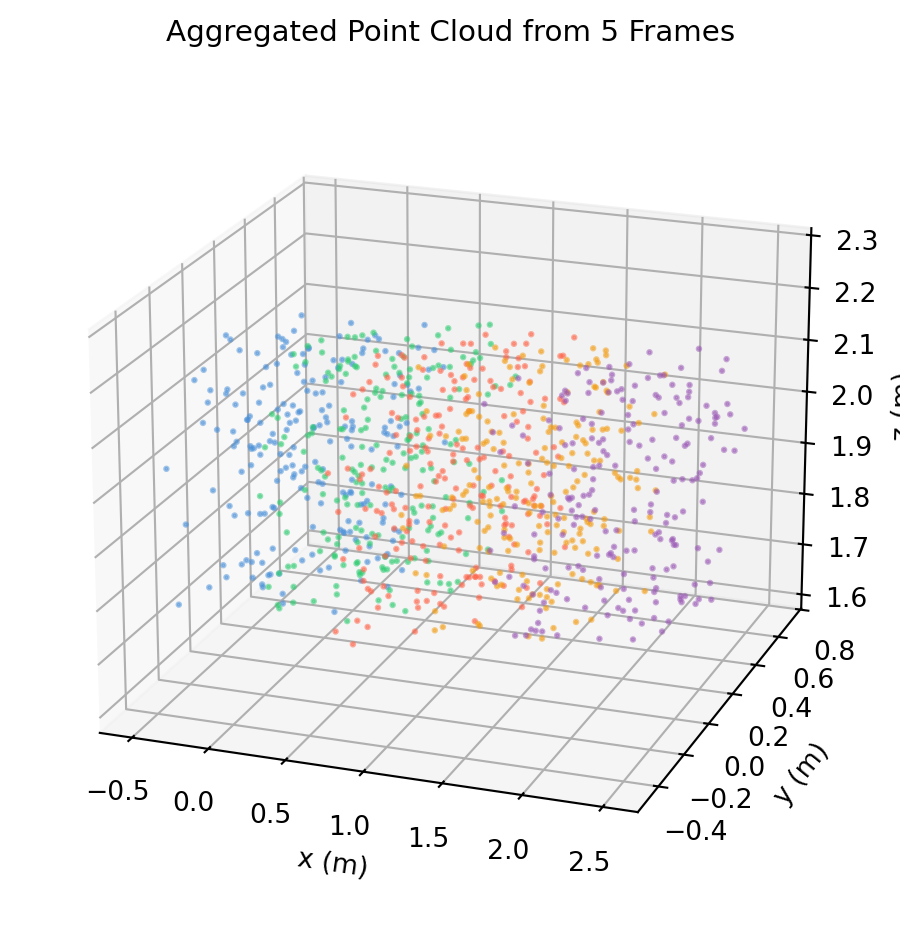
9.7.4 Multi-Frame Aggregation

In a moving robot, each depth frame has a different \(T_{\text{WC}}(t)\). To build a consistent 3D map, you transform every frame’s point cloud into the world frame before aggregating.

import numpy as np
import matplotlib.pyplot as plt

rng = np.random.default_rng(7)

def make_T(R, t):
    T = np.eye(4); T[:3,:3]=R; T[:3,3]=t; return T

def Rz(g):
    c,s=np.cos(g),np.sin(g)
    return np.array([[c,-s,0.],[s,c,0.],[0.,0.,1.]])

def Rx(a):
    c,s=np.cos(a),np.sin(a)
    return np.array([[1.,0.,0.],[0.,c,-s],[0.,s,c]])

def make_cloud(n=300):
    """Random point cloud in camera frame: mostly in front (z>0)."""
    pts = rng.uniform(-0.5, 0.5, (n, 3))
    pts[:, 2] = np.abs(pts[:, 2]) + 0.5
    return pts   # shape (n, 3)

# Robot moves forward along x, camera rotates slightly each frame
frames = [
    (0.0, 0.),
    (0.5, 10.),
    (1.0, 20.),
    (1.5, 10.),
    (2.0, 0.),
]

colors = ['#4a90d9', '#2ecc71', 'tomato', '#f39c12', '#9b59b6']

fig = plt.figure(figsize=(8, 5))
ax = fig.add_subplot(111, projection='3d')

all_pts_W = []
for (x_robot, yaw_deg), col in zip(frames, colors):
    T_WC = make_T(Rz(np.deg2rad(yaw_deg)) @ Rx(np.deg2rad(-10.)),
                  np.array([x_robot, 0., 1.2]))   # shape (4, 4)

    pts_C = make_cloud(200)                                         # shape (200, 3)
    pts_C_h = np.column_stack([pts_C, np.ones(200)])                # shape (200, 4)
    pts_W   = (T_WC @ pts_C_h.T).T[:, :3]                          # shape (200, 3)
    all_pts_W.append(pts_W)

    ax.scatter(pts_W[:, 0], pts_W[:, 1], pts_W[:, 2],
               s=2, alpha=0.5, color=col)

ax.set_xlabel('x (m)'); ax.set_ylabel('y (m)'); ax.set_zlabel('z (m)')
ax.set_title('Aggregated Point Cloud from 5 Frames', fontsize=11)
ax.view_init(elev=20, azim=-70)
plt.tight_layout()
plt.show()


9.7.5 Kaggle Exploration

Dataset: Intel RealSense D435i — Point Cloud & IMU (or search Kaggle for “RealSense depth point cloud”)

# Assumes the Kaggle dataset is downloaded and contains
# depth PNG files and a poses CSV with columns:
#   frame_id, tx, ty, tz, qw, qx, qy, qz

import numpy as np
import pandas as pd
from PIL import Image
import matplotlib.pyplot as plt

poses = pd.read_csv('poses.csv')   # columns: frame_id, tx,ty,tz, qw,qx,qy,qz

def quat_to_mat(q):
    w,x,y,z = q / np.linalg.norm(q)
    return np.array([[1-2*(y*y+z*z),2*(x*y-w*z),2*(x*z+w*y)],
                     [2*(x*y+w*z),1-2*(x*x+z*z),2*(y*z-w*x)],
                     [2*(x*z-w*y),2*(y*z+w*x),1-2*(x*x+y*y)]])

def make_T(R, t):
    T = np.eye(4); T[:3,:3]=R; T[:3,3]=t; return T

# Intrinsics (from camera_info topic or calibration file)
fx, fy, cx, cy = 615., 615., 320., 240.

all_pts_W = []
for _, row in poses.iterrows():
    depth_img = np.array(Image.open(f"depth_{int(row.frame_id):04d}.png"))  # shape (H, W)
    depth_m   = depth_img.astype(float) / 1000.                              # mm → m

    v_arr, u_arr = np.nonzero(depth_m > 0)
    d_arr = depth_m[v_arr, u_arr]

    pts_C = np.column_stack([(u_arr-cx)*d_arr/fx,
                              (v_arr-cy)*d_arr/fy,
                              d_arr])   # shape (N, 3)

    q = np.array([row.qw, row.qx, row.qy, row.qz])
    T_WC = make_T(quat_to_mat(q), np.array([row.tx, row.ty, row.tz]))
    pts_C_h = np.column_stack([pts_C, np.ones(len(pts_C))])
    pts_W   = (T_WC @ pts_C_h.T).T[:, :3]
    all_pts_W.append(pts_W)

cloud = np.vstack(all_pts_W)   # shape (total_pts, 3)
fig = plt.figure(figsize=(8,6))
ax = fig.add_subplot(111, projection='3d')
ax.scatter(cloud[::10,0], cloud[::10,1], cloud[::10,2], s=0.5, alpha=0.3, c='#4a90d9')
ax.set_title('Reconstructed Scene from RealSense Depth Stream')
plt.tight_layout(); plt.show()

9.8 Exercises and Solutions


9.8.1 Exercise 9.1 — SE(3) Group Axioms

(a) Show that SE(3) is closed under composition: if \((R_1, \mathbf{t}_1)\) and \((R_2, \mathbf{t}_2)\) are in SE(3), prove their composition is also in SE(3).

(b) Verify numerically that SE(3) composition is not commutative by constructing two transforms whose order of application produces different end-effector positions.

(c) What is the identity element of SE(3)? Verify \(T \circ I = T\).

import numpy as np

def make_T(R, t):
    T = np.eye(4); T[:3,:3] = R; T[:3,3] = t
    return T   # shape (4, 4)

def Rz(g):
    c, s = np.cos(g), np.sin(g)
    return np.array([[c,-s,0.],[s,c,0.],[0.,0.,1.]])

def Ry(b):
    c, s = np.cos(b), np.sin(b)
    return np.array([[c,0.,s],[0.,1.,0.],[-s,0.,c]])

# (a) Closure: compose two SE(3) elements and check the result is in SE(3)
T1 = make_T(Rz(np.deg2rad(40.)), np.array([1., 0., 0.]))   # shape (4, 4)
T2 = make_T(Ry(np.deg2rad(25.)), np.array([0., 2., 0.]))   # shape (4, 4)
T12 = T2 @ T1                                               # shape (4, 4)
R12 = T12[:3, :3]

print("(a) Closure check:")
print(f"  det(R_composed) = {np.linalg.det(R12):.8f}  (should be +1)")
print(f"  R^T R = I?       {np.allclose(R12.T @ R12, np.eye(3))}")
print(f"  Bottom row:      {T12[3, :]}")

# (b) Non-commutativity
T21 = T1 @ T2   # shape (4, 4)
print(f"\n(b) Non-commutativity:")
print(f"  T2@T1 translation: {T12[:3,3].round(4)}")
print(f"  T1@T2 translation: {T21[:3,3].round(4)}")
print(f"  Same? {np.allclose(T12, T21)}")

# (c) Identity
T_id = np.eye(4)   # shape (4, 4)
print(f"\n(c) Identity: T @ I = T?  {np.allclose(T1 @ T_id, T1)}")
(a) Closure check:
  det(R_composed) = 1.00000000  (should be +1)
  R^T R = I?       True
  Bottom row:      [0. 0. 0. 1.]

(b) Non-commutativity:
  T2@T1 translation: [ 0.9063  2.     -0.4226]
  T1@T2 translation: [-0.2856  1.5321  0.    ]
  Same? False

(c) Identity: T @ I = T?  True

9.8.2 Exercise 9.2 — Closed-Form Inverse

(a) Derive \(T^{-1}\) algebraically from the block structure of \(T\).

(b) Implement T_inv using only transposes and matrix-vector products (no np.linalg.inv). Verify against np.linalg.inv on a random transform.

(c) Benchmark: time the closed-form inverse vs np.linalg.inv on 10 000 transforms.

import numpy as np
import time

def make_T(R, t):
    T = np.eye(4); T[:3,:3] = R; T[:3,3] = t
    return T

def Rz(g):
    c, s = np.cos(g), np.sin(g)
    return np.array([[c,-s,0.],[s,c,0.],[0.,0.,1.]])

def T_inv_closed(T):
    """Closed-form SE(3) inverse — O(9) mults."""
    R = T[:3, :3]; t = T[:3, 3]
    Ti = np.eye(4)
    Ti[:3, :3] =  R.T
    Ti[:3,  3] = -R.T @ t
    return Ti   # shape (4, 4)

rng = np.random.default_rng(0)

# (b) single random transform
angle = rng.uniform(0, 2*np.pi)
T = make_T(Rz(angle), rng.uniform(-5, 5, 3))   # shape (4, 4)

Ti_closed = T_inv_closed(T)
Ti_numpy  = np.linalg.inv(T)
print(f"(b) Match: {np.allclose(Ti_closed, Ti_numpy)}")
print(f"    T @ T_inv = I?  {np.allclose(T @ Ti_closed, np.eye(4))}")

# (c) timing
angles = rng.uniform(0, 2*np.pi, 10_000)
Ts = np.array([make_T(Rz(a), rng.uniform(-5,5,3)) for a in angles])   # shape (10000, 4, 4)

t0 = time.perf_counter()
for T in Ts: T_inv_closed(T)
t_closed = time.perf_counter() - t0

t0 = time.perf_counter()
for T in Ts: np.linalg.inv(T)
t_numpy = time.perf_counter() - t0

print(f"\n(c) 10 000 inversions:")
print(f"  Closed-form: {t_closed*1000:.1f} ms")
print(f"  np.linalg.inv: {t_numpy*1000:.1f} ms")
print(f"  Speedup: {t_numpy/t_closed:.1f}×")
(b) Match: True
    T @ T_inv = I?  True

(c) 10 000 inversions:
  Closed-form: 30.5 ms
  np.linalg.inv: 30.3 ms
  Speedup: 1.0×

9.8.3 Exercise 9.3 — Frame Chaining

A robot arm has three frames: world (W), shoulder (S), wrist (Wr), gripper (G).

  • \(T_{WS}\): shoulder is 0.5 m to the right of world, rotated 30° about \(z\).
  • \(T_{SWr}\): wrist is 0.4 m in front of shoulder, no rotation.
  • \(T_{WrG}\): gripper is 0.2 m below wrist, rotated 45° about \(z\).

Find the gripper position in world frame and the world-to-gripper transform.

import numpy as np

def make_T(R, t):
    T = np.eye(4); T[:3,:3] = R; T[:3,3] = t
    return T

def T_inv(T):
    R = T[:3,:3]; t = T[:3,3]
    Ti = np.eye(4); Ti[:3,:3] = R.T; Ti[:3,3] = -R.T@t
    return Ti

def Rz(g):
    c, s = np.cos(g), np.sin(g)
    return np.array([[c,-s,0.],[s,c,0.],[0.,0.,1.]])

T_WS  = make_T(Rz(np.deg2rad(30.)),  np.array([0.5, 0., 0.]))   # shape (4, 4)
T_SWr = make_T(np.eye(3),            np.array([0.4, 0., 0.]))   # shape (4, 4)
T_WrG = make_T(Rz(np.deg2rad(45.)), np.array([0., 0., -0.2]))   # shape (4, 4)

# World → gripper
T_WG = T_WS @ T_SWr @ T_WrG   # shape (4, 4)

print("Gripper pose in world frame:")
print(T_WG.round(4))
print(f"\nGripper position: {T_WG[:3,3].round(4)}")

# World-to-gripper (inverse)
T_GW = T_inv(T_WG)
print(f"\nT_WG @ T_GW = I?  {np.allclose(T_WG @ T_GW, np.eye(4))}")
Gripper pose in world frame:
[[ 0.2588 -0.9659  0.      0.8464]
 [ 0.9659  0.2588  0.      0.2   ]
 [ 0.      0.      1.     -0.2   ]
 [ 0.      0.      0.      1.    ]]

Gripper position: [ 0.8464  0.2    -0.2   ]

T_WG @ T_GW = I?  True

9.8.4 Exercise 9.4 — The w=0 Bug

A buggy implementation applies the full 4×4 transform \(T\) to a direction vector with \(w = 1\) instead of \(w = 0\).

(a) Show that the translation contaminates the direction.

(b) Fix the bug by using \(w = 0\) and verify the direction is only rotated.

import numpy as np

def make_T(R, t):
    T = np.eye(4); T[:3,:3] = R; T[:3,3] = t
    return T

def Rz(g):
    c, s = np.cos(g), np.sin(g)
    return np.array([[c,-s,0.],[s,c,0.],[0.,0.,1.]])

T = make_T(Rz(np.pi/4), np.array([10., 20., 0.]))   # large translation
direction = np.array([1., 0., 0.])                   # unit vector along x

# (a) Bug: w=1 applied to a direction
d_bug = T @ np.array([*direction, 1.])  # shape (4,)
print(f"(a) Bug (w=1):  {d_bug[:3].round(4)}")
print(f"    ||d_bug|| = {np.linalg.norm(d_bug[:3]):.4f}  (translation contaminates)")

# (b) Fix: w=0
d_fix = T @ np.array([*direction, 0.])  # shape (4,)
print(f"\n(b) Fix (w=0):  {d_fix[:3].round(4)}")
print(f"    ||d_fix|| = {np.linalg.norm(d_fix[:3]):.4f}  (pure rotation, unit preserved)")

# Pure rotation of direction
d_rot_only = Rz(np.pi/4) @ direction   # shape (3,)
print(f"\n    R@d:        {d_rot_only.round(4)}")
print(f"    Match:      {np.allclose(d_fix[:3], d_rot_only)}")
(a) Bug (w=1):  [10.7071 20.7071  0.    ]
    ||d_bug|| = 23.3115  (translation contaminates)

(b) Fix (w=0):  [0.7071 0.7071 0.    ]
    ||d_fix|| = 1.0000  (pure rotation, unit preserved)

    R@d:        [0.7071 0.7071 0.    ]
    Match:      True

9.8.5 Exercise 9.5 — Normal Transform Under Scaling

A mesh vertex has normal \(\mathbf{n} = [0, 1, 0]\). A non-uniform scale matrix \(M = \text{diag}(2, 0.5, 1)\) is applied to the mesh.

(a) Show that applying \(M\) directly to \(\mathbf{n}\) gives the wrong result.

(b) Apply \((M^{-T})\) and verify the corrected normal is perpendicular to the transformed surface tangent.

import numpy as np

M = np.diag([2., 0.5, 1.])   # shape (3, 3) — non-uniform scale

# Surface tangent along x, normal along y
tangent = np.array([1., 0., 0.])   # shape (3,)
normal  = np.array([0., 1., 0.])   # shape (3,)

# Check original orthogonality
print(f"Original n · t = {np.dot(normal, tangent):.2f}  (should be 0)")

# Transform tangent
t_prime = M @ tangent   # shape (3,)

# (a) Wrong normal transform
n_wrong = M @ normal    # shape (3,)
print(f"\n(a) n_wrong = {n_wrong}")
print(f"    n_wrong · t' = {np.dot(n_wrong, t_prime):.4f}  (should be 0, is not)")

# (b) Correct normal transform
n_correct = np.linalg.inv(M).T @ normal   # shape (3,)
print(f"\n(b) n_correct = {n_correct}")
print(f"    n_correct · t' = {np.dot(n_correct, t_prime):.6f}  (≈ 0 ✓)")
Original n · t = 0.00  (should be 0)

(a) n_wrong = [0.  0.5 0. ]
    n_wrong · t' = 0.0000  (should be 0, is not)

(b) n_correct = [0. 2. 0.]
    n_correct · t' = 0.000000  (≈ 0 ✓)

9.8.7 Exercise 9.7 — DH Parameterisation

A SCARA-like arm has DH parameters:

\(i\) \(\theta_i\) \(d_i\) \(a_i\) \(\alpha_i\)
1 \(q_1\) 0 0.5 0
2 \(q_2\) 0 0.4 0
3 0 \(q_3\) 0 0

Compute the end-effector pose for \(q_1 = 45°\), \(q_2 = -30°\), \(q_3 = 0.2\) m.

import numpy as np

def make_T(R, t):
    T = np.eye(4); T[:3,:3] = R; T[:3,3] = t
    return T

def Rz(g):
    c,s=np.cos(g),np.sin(g); return np.array([[c,-s,0.],[s,c,0.],[0.,0.,1.]])

def Rx(a):
    c,s=np.cos(a),np.sin(a); return np.array([[1.,0.,0.],[0.,c,-s],[0.,s,c]])

def dh_matrix(theta, d, a, alpha):
    """Standard DH joint matrix.  Returns shape (4, 4)."""
    return (make_T(Rz(theta), np.zeros(3))
            @ make_T(np.eye(3), np.array([0.,0.,d]))
            @ make_T(np.eye(3), np.array([a,0.,0.]))
            @ make_T(Rx(alpha), np.zeros(3)))

q1, q2, q3 = np.deg2rad(45.), np.deg2rad(-30.), 0.2

T1 = dh_matrix(theta=q1, d=0.,  a=0.5, alpha=0.)   # shape (4, 4)
T2 = dh_matrix(theta=q2, d=0.,  a=0.4, alpha=0.)   # shape (4, 4)
T3 = dh_matrix(theta=0., d=q3,  a=0.,  alpha=0.)   # shape (4, 4)

T_end = T1 @ T2 @ T3   # shape (4, 4)
print("End-effector pose:")
print(T_end.round(4))
print(f"\nPosition: {T_end[:3,3].round(4)}")
End-effector pose:
[[ 0.9659 -0.2588  0.      0.7399]
 [ 0.2588  0.9659  0.      0.4571]
 [ 0.      0.      1.      0.2   ]
 [ 0.      0.      0.      1.    ]]

Position: [0.7399 0.4571 0.2   ]

9.8.8 Exercise 9.8 — Dual Quaternion Round-Trip

(a) Encode an SE(3) pose as a dual quaternion.

(b) Recover the rotation matrix and translation from the dual quaternion.

(c) Verify the round-trip matches the original 4×4 matrix.

import numpy as np

def quat_mul(p, q):
    pw,px,py,pz=p; qw,qx,qy,qz=q
    return np.array([pw*qw-px*qx-py*qy-pz*qz,
                     pw*qx+px*qw+py*qz-pz*qy,
                     pw*qy-px*qz+py*qw+pz*qx,
                     pw*qz+px*qy-py*qx+pz*qw])

def axis_angle_to_quat(k, theta):
    return np.array([np.cos(theta/2.), *(np.sin(theta/2.)*k)])

def make_dq(qr, t):
    qd = 0.5*quat_mul(np.array([0.,t[0],t[1],t[2]]), qr)
    return qr, qd

def dq_to_t(qr, qd):
    qrc = np.array([qr[0],-qr[1],-qr[2],-qr[3]])
    return (2.*quat_mul(qd,qrc))[1:]

def quat_to_mat(q):
    w,x,y,z = q/np.linalg.norm(q)
    return np.array([[1-2*(y*y+z*z),2*(x*y-w*z),2*(x*z+w*y)],
                     [2*(x*y+w*z),1-2*(x*x+z*z),2*(y*z-w*x)],
                     [2*(x*z-w*y),2*(y*z+w*x),1-2*(x*x+y*y)]])

def make_T(R, t):
    T = np.eye(4); T[:3,:3]=R; T[:3,3]=t; return T

# Original SE(3) pose
k = np.array([1.,1.,0.])/np.sqrt(2.)
qr_orig = axis_angle_to_quat(k, np.deg2rad(55.))
t_orig  = np.array([1.5, -0.5, 2.0])
T_orig  = make_T(quat_to_mat(qr_orig), t_orig)   # shape (4, 4)

# (a) Encode as dual quaternion
qr_dq, qd_dq = make_dq(qr_orig, t_orig)

# (b) Recover R and t
R_rec = quat_to_mat(qr_dq)         # shape (3, 3)
t_rec = dq_to_t(qr_dq, qd_dq)     # shape (3,)
T_rec = make_T(R_rec, t_rec)       # shape (4, 4)

print(f"(a) qr = {qr_dq.round(6)}")
print(f"    qd = {qd_dq.round(6)}")
print(f"\n(b) Recovered t = {t_rec.round(6)}")
print(f"\n(c) Round-trip T matches: {np.allclose(T_orig, T_rec)}")
print(f"    Max error: {np.max(np.abs(T_orig - T_rec)):.2e}")
(a) qr = [0.887011 0.326506 0.326506 0.      ]
    qd = [-0.163253  0.338753  0.104753  1.213516]

(b) Recovered t = [ 1.5 -0.5  2. ]

(c) Round-trip T matches: True
    Max error: 2.22e-16