NumPy Array Essentials
This section is a compact reference for the NumPy patterns used throughout the book. For a complete treatment see the NumPy documentation at https://numpy.org/doc/.
Array Creation
np.array([1.0, 2.0, 3.0])(3,)Dtype inferred; use float literals to get float64
np.zeros((m, n))(m, n)Default dtype float64
np.ones((m, n))(m, n)
np.eye(n)(n, n)np.eye(m, n, k) for rectangular or off-diagonal
np.arange(start, stop, step)(k,)Prefer linspace for floats
np.linspace(a, b, num)(num,)Inclusive at both ends
np.full((m, n), val)(m, n)Constant fill
np.diag(v)(n, n)Diagonal matrix from vector; or extract diagonal from matrix
np.block([[A, B], [C, D]])varies
Block matrix assembly
rng.standard_normal((m, n))(m, n)Always rng = np.random.default_rng(seed)
rng.integers(0, high, size=(m, n))(m, n)high is exclusive
import numpy as np= np.random.default_rng(0 )= np.array([1.0 , 2.0 , 3.0 ]) # shape (3,) = np.zeros((3 , 4 )) # shape (3, 4) = np.eye(3 ) # shape (3, 3) = np.linspace(0.0 , 1.0 , 5 ) # shape (5,) = rng.standard_normal((3 , 3 )) # shape (3, 3) = np.diag(np.array([1.0 , 2.0 , 3.0 ])) # shape (3, 3) # Block matrix: [[I, 0], [0, 2I]] = np.block([[np.eye(2 ), np.zeros((2 , 2 ))],2 , 2 )), 2.0 * np.eye(2 )]]) # shape (4, 4) print ("v :" , v.shape, v.dtype)print ("A :" , A.shape, A.dtype)print ("I3 :" , I3.shape, I3.dtype)print ("x :" , x)print ("M : \n " , M.round (3 ))print ("blk diagonal:" , blk.diagonal())
v  : (3,) float64
A  : (3, 4) float64
I3 : (3, 3) float64
x  : [0.   0.25 0.5  0.75 1.  ]
M  :
 [[ 0.126 -0.132  0.64 ]
 [ 0.105 -0.536  0.362]
 [ 1.304  0.947 -0.704]]
blk diagonal: [1. 1. 2. 2.]
Inspecting Arrays
.shapeTuple of dimension sizes
.ndimNumber of axes
.dtypeElement data type
.sizeTotal element count
.itemsizeBytes per element
.nbytesTotal bytes (size * itemsize)
.TTransposed view (no copy for 2-D)
import numpy as np= np.eye(4 , dtype= np.float32) # shape (4, 4) print (f"shape= { A. shape} ndim= { A. ndim} dtype= { A. dtype} " )print (f"size= { A. size} itemsize= { A. itemsize} bytes nbytes= { A. nbytes} bytes" )
shape=(4, 4)  ndim=2  dtype=float32
size=16  itemsize=4 bytes  nbytes=64 bytes
Core Operations
Matrix multiply
A @ BUse @; never np.dot for matrices
Element-wise multiply
A * BRequires broadcastable shapes
Scalar multiply
3.0 * AReturns a new array
Transpose
A.TView; .conj().T for Hermitian
Solve \(Ax = b\)
np.linalg.solve(A, b)Square A only
Least-squares
np.linalg.lstsq(A, b, rcond=None)Returns (x, residuals, rank, sv)
Sum along axis
A.sum(axis=0)Reduces that axis
Mean along axis
A.mean(axis=1)
Clip
np.clip(A, lo, hi)
import numpy as np= np.random.default_rng(1 )= rng.standard_normal((3 , 3 )) # shape (3, 3) = rng.standard_normal((3 ,)) # shape (3,) = np.linalg.solve(A, b) # shape (3,) = np.linalg.norm(A @ x - b)print (f"||Ax - b|| = { res:.2e} " )= rng.standard_normal((3 , 3 )) # shape (3, 3) = A @ B # shape (3, 3) matrix product = A * B # shape (3, 3) Hadamard product print ("matmul == elemwise:" , np.allclose(C_mat, C_elem))
||Ax - b|| = 6.09e-16
matmul == elemwise: False
Shape Manipulation
A.reshape(m, n)New shape; total element count unchanged
A.ravel()Flatten to 1-D, C order (may return a view)
A.flatten()Flatten to 1-D, always copies
A.squeeze()Remove all size-1 axes
A[np.newaxis, :]Insert size-1 axis at front
np.expand_dims(A, axis)Insert size-1 axis at position
np.concatenate([A, B], axis)Join along existing axis
np.stack([A, B], axis)Join along new axis
np.hstack([A, B])Column-wise join
np.vstack([A, B])Row-wise join
np.tile(A, (r, c))Repeat A in a grid of r rows x c cols
np.repeat(A, k, axis)Repeat each element k times along axis
np.split(A, k, axis)Split into k equal parts (or at indices)
import numpy as np= np.arange(12.0 ) # shape (12,) = v.reshape(3 , 4 ) # shape (3, 4) = v.reshape(- 1 , 1 ) # shape (12, 1) column vector = v.reshape(1 , - 1 ) # shape (1, 12) row vector print ("v :" , v.shape)print ("A :" , A.shape)print ("col :" , col.shape)print ("row :" , row.shape)print ("col.squeeze() :" , col.squeeze().shape) # (12,) # tile: repeat a (2, 2) block in a 2x3 grid -> (4, 6) = np.array([[1.0 , 0.0 ], [0.0 , 1.0 ]]) # shape (2, 2) = np.tile(B, (2 , 3 )) # shape (4, 6) print ("tile shape:" , T.shape)
v   : (12,)
A   : (3, 4)
col : (12, 1)
row : (1, 12)
col.squeeze() : (12,)
tile shape: (4, 6)
Indexing
import numpy as np= np.arange(16.0 ).reshape(4 , 4 ) # shape (4, 4) = A[0 , :] # shape (4,) first row (view) = A[:, 1 ] # shape (4,) second column (view) = A[1 :3 , 2 :4 ] # shape (2, 2) submatrix (view) # Boolean indexing -- always returns a copy = A[A > 10 ] # shape (k,) print ("elements > 10:" , large)# Fancy indexing -- always returns a copy = np.array([0 , 2 ]) # shape (2,) print ("rows 0 and 2: \n " , A[idx]) # shape (2, 4) # Setting elements with boolean mask = A.copy() # shape (4, 4) > 10 ] = 0.0 print ("max after zeroing >10:" , A2.max ())
elements > 10: [11. 12. 13. 14. 15.]
rows 0 and 2:
 [[ 0.  1.  2.  3.]
 [ 8.  9. 10. 11.]]
max after zeroing >10: 10.0
Mathematical Functions (Ufuncs)
NumPy’s universal functions apply element-wise to arrays of any shape.
np.sqrt(A)Element-wise square root
np.abs(A)Absolute value
np.exp(A)\(e^x\) element-wise
np.log(A)Natural logarithm; np.log2, np.log10 also available
np.sin(A), np.cos(A), np.tan(A)Trigonometric functions (radians)
np.arctan2(y, x)Four-quadrant arctangent; returns angle in \((-\pi, \pi]\)
np.sign(A)\(-1\) , \(0\) , or \(+1\) for each element
np.floor(A), np.ceil(A)Round toward \(-\infty\) / \(+\infty\)
np.maximum(A, B)Element-wise max of two arrays; broadcasts
np.minimum(A, B)Element-wise min of two arrays; broadcasts
np.clip(A, lo, hi)Clamp to \([\text{lo}, \text{hi}]\)
np.isnan(A)Boolean mask of NaN positions
np.isinf(A)Boolean mask of Inf positions
np.isfinite(A)True where finite (not NaN, not Inf)
np.allclose(A, B)True if all |A - B| <= atol + rtol * |B|
import numpy as np= np.random.default_rng(2 )= rng.standard_normal((5 ,)) # shape (5,) print ("v :" , v.round (3 ))print ("abs(v) :" , np.abs (v).round (3 ))print ("exp(v) :" , np.exp(v).round (3 ))print ("sign(v) :" , np.sign(v))# arctan2 for angle between vectors = np.array([1.0 , 0.0 ]) # shape (2,) = np.array([0.0 , 1.0 ]) # shape (2,) = np.arctan2(b[1 ] - a[1 ], b[0 ] - a[0 ])print (f"angle from a to b: { np. degrees(angle_rad):.1f} deg" )# Check for numerical issues = np.array([1.0 , np.nan, np.inf, - np.inf, 0.0 ]) # shape (5,) print ("isfinite:" , np.isfinite(w))
v        : [ 0.189 -0.523 -0.413 -2.441  1.8  ]
abs(v)   : [0.189 0.523 0.413 2.441 1.8  ]
exp(v)   : [1.208 0.593 0.662 0.087 6.048]
sign(v)  : [ 1. -1. -1. -1.  1.]
angle from a to b: 135.0 deg
isfinite: [ True False False False  True]
Reductions
A.sum() / np.sum(A)Sum all elements; axis=k reduces along axis k
A.prod()Product of all elements
A.max() / A.min()Global max / min
A.argmax() / A.argmin()Flat index of global max / min
A.max(axis=0)Column-wise max; returns shape (n,)
A.argmax(axis=0)Row index of column-wise max
A.mean() / A.std() / A.var()Mean, standard deviation, variance
np.cumsum(A, axis)Cumulative sum along axis
np.all(A > 0)True if all elements satisfy condition
np.any(A > 0)True if any element satisfies condition
np.count_nonzero(A)Number of non-zero elements
np.trace(A)Sum of diagonal elements
import numpy as np= np.random.default_rng(3 )= rng.standard_normal((4 , 5 )) # shape (4, 5) print ("sum all :" , A.sum ())print ("sum rows :" , A.sum (axis= 1 ).round (3 )) # shape (4,) print ("sum cols :" , A.sum (axis= 0 ).round (3 )) # shape (5,) print ("max per col :" , A.max (axis= 0 ).round (3 )) # shape (5,) print ("argmax flat :" , A.argmax()) # index in flattened array # cumsum along rows (axis=1) = np.cumsum(A, axis= 1 ) # shape (4, 5) print ("cumsum row 0:" , cs[0 ].round (3 ))# logical tests print ("all > -5 :" , np.all (A > - 5 ))print ("any > 2 :" , np.any (A > 2 ))print ("trace I4 :" , np.trace(np.eye(4 )))
sum all     : -2.647576308940009
sum rows    : [-1.117 -0.01  -2.131  0.611]
sum cols    : [ 1.66  -4.446 -0.334 -1.143  1.615]
max per col : [2.041 0.482 0.418 0.958 3.323]
argmax flat : 9
cumsum row 0: [ 2.041 -0.515 -0.097 -0.664 -1.117]
all > -5 : True
any > 2  : True
trace I4 : 4.0
Sorting and Searching
np.sort(A)Sort elements along last axis; returns a copy
np.sort(A, axis=0)Sort each column
np.argsort(A)Indices that would sort the array
np.argsort(A)[::-1]Descending sort indices for 1-D A
np.where(cond)Tuple of indices where condition is True
np.where(cond, x, y)Element-wise select: x if True, y if False
np.nonzero(A)Tuple of index arrays for non-zero positions
np.unique(A)Sorted unique values
np.unique(A, return_counts=True)Also return occurrence counts
np.searchsorted(v, val)Index where val would be inserted in sorted v
import numpy as np= np.random.default_rng(4 )= rng.integers(0 , 10 , size= (8 ,)) # shape (8,) print ("v :" , v)= np.sort(v) # shape (8,) ascending copy = np.argsort(v) # shape (8,) = np.argsort(v)[::- 1 ] # descending order indices print ("sorted :" , sorted_v)print ("argsort :" , sort_idx)print ("desc order:" , v[sort_desc])# Where = np.array([3.0 , - 1.0 , 5.0 , - 2.0 , 0.5 ]) # shape (5,) = np.where(vals > 0 ) # tuple of 1-D arrays print ("positive indices:" , pos_idx[0 ])= np.where(vals > 0 , vals, 0.0 ) # shape (5,) print ("clipped < 0 -> 0:" , clipped)# Unique = np.array([2 , 1 , 2 , 3 , 1 , 3 , 3 ]) # shape (7,) = np.unique(labels, return_counts= True )print ("unique :" , uniq, " counts:" , counts)
v         : [7 9 8 5 9 9 9 0]
sorted    : [0 5 7 8 9 9 9 9]
argsort   : [7 3 0 2 1 4 5 6]
desc order: [9 9 9 9 8 7 5 0]
positive indices: [0 2 4]
clipped < 0 -> 0: [3.  0.  5.  0.  0.5]
unique : [1 2 3]   counts: [2 2 3]
Random Number Generation
Always use np.random.default_rng(seed) for reproducible results. The legacy np.random.seed() / np.random.randn() API is deprecated in new code.
np.random.default_rng(seed)Generatorseed is an integer or None
rng.standard_normal(size)float64 N(0,1)
Most-used for linear algebra demos
rng.uniform(lo, hi, size)float64 U[lo, hi)
rng.integers(lo, hi, size)int64
hi is exclusive
rng.choice(n, size, replace)int64
Subsample indices
rng.permutation(n)int64 shape (n,)
Random permutation; rng.shuffle is in-place
rng.multivariate_normal(mu, cov)float64 shape (d,) or (n, d)
import numpy as np= np.random.default_rng(42 )= rng.standard_normal((4 ,)) # shape (4,) = rng.uniform(- 1.0 , 1.0 , size= (3 , 3 )) # shape (3, 3) = rng.integers(0 , 10 , size= (5 ,)) # shape (5,) = rng.permutation(6 ) # shape (6,) # Sample from a 2-D Gaussian = np.zeros(2 ) # shape (2,) = np.array([[1.0 , 0.6 ], [0.6 , 1.0 ]]) # shape (2, 2) = rng.multivariate_normal(mu, cov, size= 5 ) # shape (5, 2) print ("x :" , x.round (3 ))print ("k :" , k)print ("idx :" , idx)print ("pts : \n " , pts.round (3 ))
x   : [ 0.305 -1.04   0.75   0.941]
k   : [4 8 5 4 4]
idx : [1 0 5 4 3 2]
pts :
 [[ 0.127 -0.038]
 [ 0.062  1.156]
 [ 0.33  -0.053]
 [ 0.077  0.553]
 [-0.511 -0.142]]
Batch Operations with np.einsum
np.einsum expresses tensor contractions with a subscript string. It is useful when @ is not enough for batched or non-standard contractions.
np.einsum('ij,j->i', A, v)A @ vMatrix-vector product
np.einsum('ij,jk->ik', A, B)A @ BMatrix-matrix product
np.einsum('ij->ji', A)A.TTranspose
np.einsum('ii->', A)np.trace(A)Trace
np.einsum('ij,ij->', A, B)(A * B).sum()Frobenius inner product
np.einsum('i,j->ij', u, v)np.outer(u, v)Outer product
np.einsum('bij,bjk->bik', A, B)batch A @ B
Batched matrix product
import numpy as np= np.random.default_rng(5 )= rng.standard_normal((3 , 4 )) # shape (3, 4) = rng.standard_normal((4 , 5 )) # shape (4, 5) = rng.standard_normal((4 ,)) # shape (4,) # Basic contractions print ("A@v via einsum:" , np.allclose(np.einsum('ij,j->i' , A, v), A @ v))print ("A@B via einsum:" , np.allclose(np.einsum('ij,jk->ik' , A, B), A @ B))print ("trace via einsum:" , np.einsum('ii->' , np.eye(5 ))) # 5.0 # Batched matrix product: 10 matrices of shape (3, 4) times (4, 5) = rng.standard_normal((10 , 3 , 4 )) # shape (10, 3, 4) = rng.standard_normal((10 , 4 , 5 )) # shape (10, 4, 5) = np.einsum('bij,bjk->bik' , batch_A, batch_B) # shape (10, 3, 5) # Equivalent via matmul broadcasting: = batch_A @ batch_B # shape (10, 3, 5) print ("batched einsum == matmul:" , np.allclose(batch_C, batch_C2))
A@v via einsum: True
A@B via einsum: True
trace via einsum: 5.0
batched einsum == matmul: True
Shape and Dtype Pitfalls
The bugs described here account for the majority of numerical errors and silent-wrong-answer issues in linear-algebra code.
Rank-1 Arrays: (n,) vs (n, 1) vs (1, n)
NumPy has a rank-1 array type — shape (n,) — that behaves like neither a row vector nor a column vector.
import numpy as np= np.array([1.0 , 2.0 , 3.0 ]) # shape (3,) rank-1 array = v.reshape(- 1 , 1 ) # shape (3, 1) column vector = v.reshape(1 , - 1 ) # shape (1, 3) row vector # Transpose of a rank-1 array is the SAME array print ("v.shape :" , v.shape)print ("v.T.shape :" , v.T.shape) # still (3,) -- NOT (1, 3) # dot product: v @ v = scalar (correct) print ("v @ v :" , v @ v) # 14.0 # outer product trap print ("v @ v.T :" , v @ v.T) # 14.0 -- still a scalar! print ("col @ row : \n " , col @ row) # shape (3, 3) outer product -- correct # matrix-vector product returns rank-1 = np.eye(3 ) # shape (3, 3) print ("(A @ v).shape :" , (A @ v).shape) # (3,) not (3, 1)
v.shape   : (3,)
v.T.shape : (3,)
v @ v     : 14.0
v @ v.T   : 14.0
col @ row :
 [[1. 2. 3.]
 [2. 4. 6.]
 [3. 6. 9.]]
(A @ v).shape : (3,)
Rules:
Use v.reshape(-1, 1) or v[:, np.newaxis] when you need a column vector.
Use np.outer(u, v) for the outer product of two rank-1 arrays.
After np.linalg.solve(A, b), the result is rank-1 (n,), not (n, 1).
Copy vs View
Basic slicing returns a view into the same memory. Modifying the view modifies the original array.
import numpy as np= np.arange(6.0 ).reshape(2 , 3 ) # shape (2, 3) # Basic slice -- VIEW = A[0 , :] # shape (3,) 0 ] = 999.0 print ("A after modifying row[0]: \n " , A) # A is changed # Boolean/fancy indexing -- always a COPY = np.arange(6.0 ).reshape(2 , 3 ) # shape (2, 3) = A2[A2 > 2 ] # shape (k,) copy 0 ] = 999.0 print ("A2 unchanged:" , A2[0 , 0 ]) # 0.0 # Break the view link with .copy() = np.arange(6.0 ).reshape(2 , 3 ) # shape (2, 3) = A3[0 , :].copy() # shape (3,) independent copy 0 ] = 999.0 print ("A3 unchanged:" , A3[0 , 0 ]) # 0.0 # Diagnostic print ("row shares memory with A :" , np.shares_memory(row, A)) # True print ("row3 shares memory with A3:" , np.shares_memory(row3, A3)) # False
A after modifying row[0]:
 [[999.   1.   2.]
 [  3.   4.   5.]]
A2 unchanged: 0.0
A3 unchanged: 0.0
row shares memory with A  : True
row3 shares memory with A3: False
Operations that return views: A[i, :], A[:, j], A[a:b, c:d], A.T, A.reshape(...).
Operations that always copy: boolean indexing, fancy indexing (integer arrays), .copy(), .flatten().
Broadcasting Rules
NumPy aligns shapes from the right and broadcasts size-1 dimensions.
import numpy as np= np.ones((3 , 4 )) # shape (3, 4) = np.ones((4 ,)) # shape (4,) aligns to last dim of A = np.ones((3 , 1 )) # shape (3, 1) broadcasts across all columns print ("(A + v).shape :" , (A + v).shape) # (3, 4) print ("(A + w).shape :" , (A + w).shape) # (3, 4) # Incompatible shapes raise an error try := np.ones((3 ,)) + np.ones((4 ,))except ValueError as err:print ("ValueError:" , err)
(A + v).shape : (3, 4)
(A + w).shape : (3, 4)
ValueError: operands could not be broadcast together with shapes (3,) (4,)
Broadcasting compatibility: shapes are compared right-to-left; two sizes are compatible if they are equal or one of them is 1.
(3, 4)(4,)(3, 4)Yes
(3, 4)(3, 1)(3, 4)Yes
(3, 4)(1, 4)(3, 4)Yes
(3, 4)(3,)Error
No – 4 != 3
(3, 1, 4)(3, 4)(3, 3, 4)Yes
2-D Annotation Slice Pitfall
When annotating matplotlib 2-D plots with vectors derived from 3-D points, always slice to 2 components before arithmetic.
import numpy as np# 3-D point and normal = np.array([1.0 , 2.0 , 3.0 ]) # shape (3,) = np.array([0.1 , 0.2 , 0.0 ]) # shape (3,) # WRONG: mixing 2-D and 3-D raises a shape error # ax.annotate(..., xy=p[:2], xytext=p[:2]+n) -- n has 3 components # Correct: slice both to 2 components = p[:2 ] + n[:2 ] # shape (2,) -- safe for 2-D annotation print ("tip:" , tip)
Memory Layout
NumPy arrays store data in a flat one-dimensional buffer. The memory layout determines which elements are adjacent in that buffer, and it affects performance when passing arrays to LAPACK, OpenCV, or compiled code.
C Order vs F Order
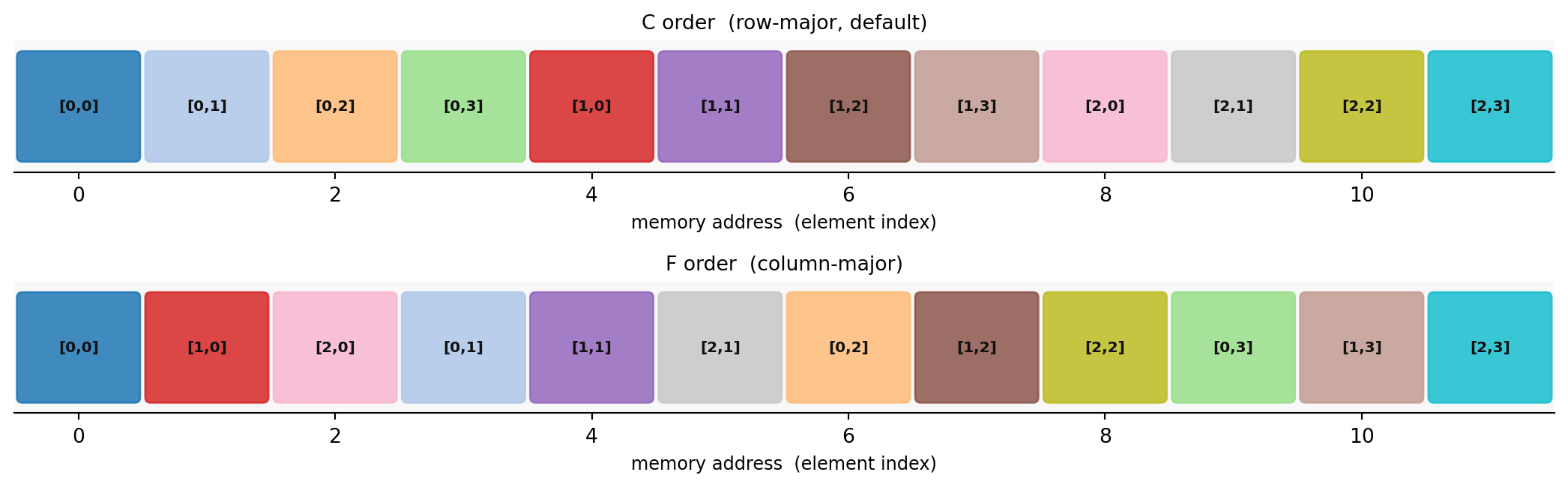
C order (row-major, the default): Elements of the same row are adjacent. Row index changes slowest; column index changes fastest.
F order (column-major): Elements of the same column are adjacent. Column index changes slowest; row index changes fastest.
import numpy as np= np.arange(12.0 ).reshape(3 , 4 ) # shape (3, 4) C order (default) print ("C_CONTIGUOUS:" , A.flags['C_CONTIGUOUS' ]) # True print ("F_CONTIGUOUS:" , A.flags['F_CONTIGUOUS' ]) # False print ("strides (bytes):" , A.strides) # (32, 8) = np.asfortranarray(A) # shape (3, 4) F order print (" \n F_CONTIGUOUS:" , B.flags['F_CONTIGUOUS' ]) # True print ("strides (bytes):" , B.strides) # (8, 24)
C_CONTIGUOUS: True
F_CONTIGUOUS: False
strides (bytes): (32, 8)

F_CONTIGUOUS: True
strides (bytes): (8, 24)
The strides tuple gives the byte step to move one position along each axis. For float64 (8 bytes per element):
C order (3, 4): strides (32, 8) – one row apart = 4 cols * 8 bytes = 32; one col apart = 8 bytes.
F order (3, 4): strides (8, 24) – one row apart = 8 bytes (adjacent); one col apart = 3 rows * 8 bytes = 24.
Visualization
import numpy as npimport matplotlib.pyplot as pltimport matplotlib.patches as mpatches= np.arange(12 ).reshape(3 , 4 ) # shape (3, 4) = A.ravel(order= 'C' ) # shape (12,) row-first sequence = A.ravel(order= 'F' ) # shape (12,) column-first sequence = plt.subplots(2 , 1 , figsize= (11 , 3.5 ))= plt.get_cmap('tab20' )for ax, label, seq in zip ('C order (row-major, default)' , 'F order (column-major)' ],- 0.5 , 11.5 )- 0.5 , 0.5 )= 10 )'memory address (element index)' , fontsize= 9 )'#f8f8f8' )'top' , 'right' , 'left' ]].set_visible(False )for i, val in enumerate (seq):= divmod (int (val), 4 )= cmap(val / 12 )= mpatches.FancyBboxPatch(- 0.44 , - 0.38 ), 0.88 , 0.76 ,= 'round,pad=0.04' , color= color, alpha= 0.85 ,0 , f'[ { row_idx} , { col_idx} ]' , ha= 'center' , va= 'center' ,= 7.5 , fontweight= 'bold' , color= '#111111' )
Same color = same matrix element. In C order, elements [0,0] [0,1] [0,2] [0,3] are the first four memory slots; in F order, [0,0] [1,0] [2,0] are the first three.
Converting Between Orders
import numpy as np= np.arange(12.0 ).reshape(3 , 4 ) # shape (3, 4) C order = np.asfortranarray(A) # shape (3, 4) F order (copies if needed) = np.ascontiguousarray(B) # shape (3, 4) C order (copies if needed) print ("A: C= {} , F= {} " .format (A.flags['C_CONTIGUOUS' ], A.flags['F_CONTIGUOUS' ]))print ("B: C= {} , F= {} " .format (B.flags['C_CONTIGUOUS' ], B.flags['F_CONTIGUOUS' ]))print ("C: C= {} , F= {} " .format (C.flags['C_CONTIGUOUS' ], C.flags['F_CONTIGUOUS' ]))
A: C=True, F=False
B: C=False, F=True
C: C=True, F=False
np.ascontiguousarray(A)C-contiguous; copies only if not already C
np.asfortranarray(A)F-contiguous; copies only if not already F
A.copy(order='C')C-contiguous copy, always
A.copy(order='F')F-contiguous copy, always
Views, Copies, and Contiguity
Many NumPy operations return views into the same memory buffer. A view may not be contiguous, which matters when passing to C/Fortran libraries.
import numpy as np= np.arange(12.0 ).reshape(3 , 4 ) # shape (3, 4) C-contiguous # Slices are views -- contiguous or not depending on the slice = A[0 , :] # shape (4,) C-contiguous (contiguous row) = A[:, 0 ] # shape (3,) NOT contiguous (stride = 32 bytes) print ("row: C_contiguous =" , row.flags['C_CONTIGUOUS' ]) # True print ("col: C_contiguous =" , col.flags['C_CONTIGUOUS' ]) # False # Transpose is a view -- always non-C-contiguous for 2-D matrices = A.T # shape (4, 3) print ("A.T: C_contiguous =" , At.flags['C_CONTIGUOUS' ]) # False print ("A.T: F_contiguous =" , At.flags['F_CONTIGUOUS' ]) # True # reshape returns a view when possible; falls back to copy when not = A.ravel() # shape (12,) view (C order) = A.T.ravel() # shape (12,) copy (A.T not C-contiguous) print ("A.ravel() shares memory:" , np.shares_memory(A, A_flat)) # True print ("A.T.ravel() shares memory:" , np.shares_memory(A, At_flat)) # False
row: C_contiguous = True
col: C_contiguous = False
A.T: C_contiguous = False
A.T: F_contiguous = True
A.ravel() shares memory: True
A.T.ravel() shares memory: False
Rule: If A.flags['C_CONTIGUOUS'] is False, call np.ascontiguousarray(A) before passing to OpenCV, Numba, or any C extension that expects a packed array.
Transpose and Contiguity
Transposing with .T reverses the strides without copying data. The transposed array is F-contiguous (not C-contiguous) for a standard 2-D matrix.
import numpy as np= np.ones((3 , 4 )) # shape (3, 4) C-contiguous; strides (32, 8) = A.T # shape (4, 3) view; strides (8, 32) print ("A strides:" , A.strides, " C=" , A.flags['C_CONTIGUOUS' ])print ("At strides:" , At.strides, " C=" , At.flags['C_CONTIGUOUS' ])print ("shares memory:" , np.shares_memory(A, At))# np.linalg handles non-contiguous arrays automatically = np.linalg.eigvalsh(At @ A) # shape (3,) -- works fine print ("eigenvalues of A.T @ A:" , vals.round (3 ))# But cv2.* requires C-contiguous uint8 = np.ascontiguousarray((At * 100 ).astype(np.uint8))print ("cv2-safe: C=" , uint_At.flags['C_CONTIGUOUS' ])
A  strides: (32, 8)  C= True
At strides: (8, 32)  C= False
shares memory: True
eigenvalues of A.T @ A: [-0.  0.  0. 12.]
cv2-safe: C= True
When Layout Matters
numpy.linalg / scipy.linalgEither (auto-converted internally)
Silent copy; minor overhead
OpenCV (cv2.*)
C-contiguous
May raise or silently corrupt output
Numba JIT (default)
C-contiguous
May fall back to object mode
Row-slicing speed
C order
Rows are contiguous; cache-friendly
Column-slicing speed
F order
Columns are contiguous; cache-friendly
Large BLAS matrix products
Matches BLAS expectations
2-10x slowdown from implicit transpose copies
scipy.linalg.lapack direct callsC or F as documented per routine
Check overwrite_a behavior
Practical rule: Create arrays in C order (the default) and call np.ascontiguousarray(A) before passing to OpenCV or Numba.
Linear Algebra Function Reference
Quick-reference tables for numpy.linalg, scipy.linalg, the sparse submodules, and the supporting SciPy utilities used throughout the book.
numpy.linalg
np.linalg.solve(A, b)xSquare \(Ax = b\) ; prefer over inv(A) @ b
np.linalg.lstsq(A, b, rcond=None)(x, res, rank, sv)Least squares; rcond=None silences FutureWarning
np.linalg.inv(A)\(A^{-1}\) Rarely needed; solve is faster and more stable
np.linalg.pinv(A)\(A^+\) Moore-Penrose pseudoinverse
np.linalg.det(A)scalar
Can overflow; prefer slogdet for large matrices
np.linalg.slogdet(A)(sign, logabsdet)Numerically stable log-determinant
np.linalg.norm(v)scalar
2-norm for vectors, Frobenius for matrices
np.linalg.norm(A, ord=2)scalar
Spectral norm (largest singular value)
np.linalg.norm(A, ord='fro')scalar
Frobenius norm
np.linalg.cond(A)scalar
Condition number \(\|A\| \cdot \|A^+\|\)
np.linalg.matrix_rank(A)int
Rank via SVD
np.linalg.eig(A)(vals, vecs)General matrix; eigenvalues may be complex
np.linalg.eigh(A)(vals, vecs)Symmetric/Hermitian; real, ascending order
np.linalg.eigvals(A)valsEigenvalues only (no vectors; faster)
np.linalg.svd(A, full_matrices=False)(U, s, Vt)Economy SVD; s is 1-D descending
np.linalg.svd(A, compute_uv=False)sSingular values only; returns 1-D array, NOT a tuple
np.linalg.cholesky(A)LLower Cholesky factor; A must be SPD
np.linalg.qr(A)(Q, R)Thin QR by default
np.linalg.matrix_power(A, n)\(A^n\) Integer powers
import numpy as np= np.random.default_rng(42 )= rng.standard_normal((4 , 4 )) # shape (4, 4) = A @ A.T + 4.0 * np.eye(4 ) # shape (4, 4) symmetric positive definite = rng.standard_normal((4 ,)) # shape (4,) = np.linalg.solve(A, b)= np.linalg.eigh(A) # vals shape (4,), vecs shape (4, 4) = np.linalg.svd(A, full_matrices= False ) # s shape (4,) -- 1-D, descending = np.linalg.svd(A, compute_uv= False ) # shape (4,) -- 1-D array directly = np.linalg.cholesky(A) # shape (4, 4) print (f"residual ||Ax-b|| : { np. linalg. norm(A@ x - b):.2e} " )print (f"eigenvalues (eigh) : { vals. round (2 )} " )print (f"singular values (svd) : { s. round (2 )} " )print (f"Cholesky check ||LLT-A||: { np. linalg. norm(L@ L.T - A):.2e} " )
residual ||Ax-b||     : 2.29e-16
eigenvalues (eigh)    : [ 4.01  5.05  8.21 11.31]
singular values (svd) : [11.31  8.21  5.05  4.01]
Cholesky check ||LLT-A||: 2.18e-15
scipy.linalg (Dense)
scipy.linalg.solve(A, b)xExtra: assume_a='sym', lower, transposed
scipy.linalg.lu(A)(P, L, U)Full LU with partial pivoting
scipy.linalg.lu_factor(A)(lu, piv)Compact packed form
scipy.linalg.lu_solve((lu, piv), b)xSolve with pre-factored matrix; efficient for many RHS
scipy.linalg.cho_factor(A)(c, lower)Cholesky; A must be SPD
scipy.linalg.cho_solve((c, lower), b)xSolve with pre-factored Cholesky
scipy.linalg.svd(A, full_matrices=False)(U, s, Vt)Adds lapack_driver option
scipy.linalg.svd(A, ..., lapack_driver='gesdd')(U, s, Vt)Divide-and-conquer; fastest for large dense
scipy.linalg.eigh(A)(vals, vecs)Symmetric; ascending eigenvalues
scipy.linalg.eigh(A, B)(vals, vecs)Generalized problem \(Ax = \lambda Bx\)
scipy.linalg.expm(A)\(e^A\) Matrix exponential; use for Lie group exp maps
scipy.linalg.logm(A)\(\log A\) Matrix logarithm
import numpy as npimport scipy.linalg= np.random.default_rng(0 )= rng.standard_normal((4 , 4 )) # shape (4, 4) = A @ A.T + 4.0 * np.eye(4 ) # shape (4, 4) SPD = rng.standard_normal((4 , 3 )) # shape (4, 3) multiple right-hand sides # Pre-factor once, solve multiple right-hand sides cheaply = scipy.linalg.lu_factor(A) # packed factorization = scipy.linalg.lu_solve((lu, piv), B) # shape (4, 3) print (f"LU solve ||AX-B|| : { np. linalg. norm(A @ X - B):.2e} " )# Cholesky = scipy.linalg.cho_factor(A) # packed Cholesky = scipy.linalg.cho_solve((c, lower), B[:, 0 ]) # shape (4,) print (f"Cholesky solve ||Ax-b||: { np. linalg. norm(A @ x_cho - B[:, 0 ]):.2e} " )# Matrix exponential: skew-symmetric -> rotation = np.array([[0. , - 1. ], [1. , 0. ]]) # shape (2, 2) 90-degree generator = scipy.linalg.expm(W) # shape (2, 2) rotation matrix print (f"expm([[0,-1],[1,0]]) = \n { expW. round (4 )} " )
LU solve ||AX-B||      : 3.74e-16
Cholesky solve ||Ax-b||: 1.31e-16
expm([[0,-1],[1,0]]) =
[[ 0.5403 -0.8415]
 [ 0.8415  0.5403]]
scipy.sparse.linalg Solvers
spsolve(A, b)Direct sparse solve
SuperLU; single RHS
factorized(A)Reuse LU across RHS
Returns callable solve_fn(b)
splu(A)Sparse LU object
.solve(b) for each RHS
cg(A, b)SPD iterative solve
Conjugate Gradient; M for preconditioner
gmres(A, b)General iterative solve
Restarts Krylov
lsqr(A, b)Sparse least squares
Returns (x, flag, rnorm, ...)
eigsh(A, k)Top-\(k\) eigenvalues, symmetric
Lanczos / ARPACK
svds(A, k)Top-\(k\) singular triplets
Returns ascending order (opposite of np.linalg.svd)
import numpy as npimport scipy.sparseimport scipy.sparse.linalg= 100 # Tridiagonal matrix (typical in finite differences) = scipy.sparse.diags(4.0 * np.ones(n), - np.ones(n - 1 ), - np.ones(n - 1 )],= [0 , 1 , - 1 ],format = 'csr' ,# shape (100, 100) = np.random.default_rng(0 )= rng.standard_normal((n,)) # shape (100,) = scipy.sparse.linalg.spsolve(A_sp, b) # shape (100,) print (f"spsolve residual : { np. linalg. norm(A_sp @ x - b):.2e} " )# Top-3 eigenvalues (ascending order from eigsh) = scipy.sparse.linalg.eigsh(A_sp, k= 3 , which= 'SM' )print (f"3 smallest eigenvalues: { vals. round (3 )} " )
spsolve residual : 1.35e-15
3 smallest eigenvalues: [2.001 2.004 2.009]
scipy.stats.chi2
Used in Chapters 19-23 for Mahalanobis thresholds and Gaussian confidence ellipsoids.
chi2.ppf(p, df=k)\(p\) -th quantile: the threshold \(c\) such that \(P(X \le c) = p\)
chi2.cdf(x, df=k)Cumulative probability \(P(X \le x)\)
chi2.sf(x, df=k)Survival function \(P(X > x) = 1 - \text{CDF}\)
from scipy.stats import chi2# 95% confidence region for a 2-D Gaussian (Mahalanobis distance threshold) = 2 = chi2.ppf(0.95 , df= df)= chi2.sf(threshold, df= df)print (f"chi2(df= { df} ).ppf(0.95) = { threshold:.4f} " )print (f"P(chi2( { df} ) > { threshold:.4f} ) = { prob_outside:.4f} " )
chi2(df=2).ppf(0.95)       = 5.9915
P(chi2(2) > 5.9915) = 0.0500
Decision Guide
Square linear system, single solve
np.linalg.solve
Square system, same matrix, many RHS
scipy.linalg.lu_factor + lu_solve
Symmetric positive definite system
scipy.linalg.cho_factor + cho_solve
Overdetermined / least squares
np.linalg.lstsq
Large sparse system (direct)
scipy.sparse.linalg.spsolve
Large sparse SPD (iterative)
scipy.sparse.linalg.cg
All eigenvalues, symmetric dense
np.linalg.eigh or scipy.linalg.eigh
Top-\(k\) eigenvalues, large sparse
scipy.sparse.linalg.eigsh
All singular values, dense
np.linalg.svd
Top-\(k\) singular values, large
scipy.sparse.linalg.svds
Matrix exponential / logarithm
scipy.linalg.expm / logm
SO(3) rotation conversions
scipy.spatial.transform.Rotation
2-D / 3-D image affine warp
scipy.ndimage.affine_transform
Chi-squared confidence thresholds
scipy.stats.chi2.ppf
OpenCV Quick Reference
OpenCV differs from NumPy/matplotlib in two critical ways: channel order is BGR not RGB , and the default image dtype is uint8 in [0, 255] .
I/O Functions
cv2.imread(path)Load image; returns (H, W, 3) BGR uint8, or None on failure
cv2.imread(path, cv2.IMREAD_GRAYSCALE)Load as (H, W) grayscale
cv2.imread(path, cv2.IMREAD_UNCHANGED)Preserve alpha channel
cv2.imwrite(path, img)Save; format inferred from file extension
import cv2= cv2.imread('photo.jpg' ) # shape (H, W, 3) uint8 BGR if img is None :raise FileNotFoundError ('cv2.imread returned None -- check the path' )print (img.shape, img.dtype) # e.g. (480, 640, 3) uint8 'output.png' , img)
Color Conversion
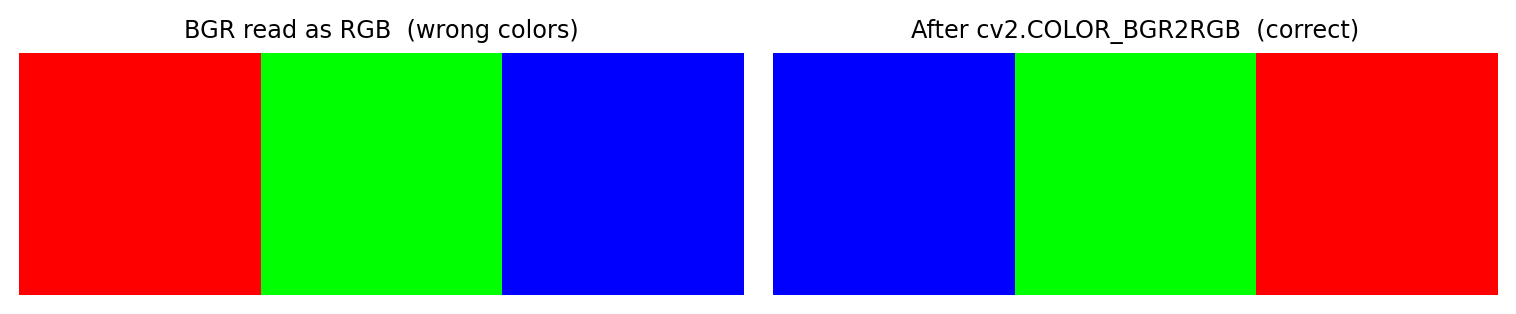
import numpy as npimport cv2import matplotlib.pyplot as plt# Synthetic BGR image: three solid patches = np.zeros((80 , 240 , 3 ), dtype= np.uint8) # shape (80, 240, 3) 80 , 0 ] = 255 # pure blue in BGR (B=255, G=0, R=0) 80 :160 , 1 ] = 255 # pure green in BGR (B=0, G=255, R=0) 160 :, 2 ] = 255 # pure red in BGR (B=0, G=0, R=255) = cv2.cvtColor(img_bgr, cv2.COLOR_BGR2RGB) # shape (80, 240, 3) RGB = plt.subplots(1 , 2 , figsize= (8 , 2.2 ))0 ].imshow(img_bgr)0 ].set_title('BGR read as RGB (wrong colors)' , fontsize= 9 )0 ].axis('off' )1 ].imshow(img_rgb)1 ].set_title('After cv2.COLOR_BGR2RGB (correct)' , fontsize= 9 )1 ].axis('off' )
cv2.COLOR_BGR2RGBBGR to RGB – required before plt.imshow
cv2.COLOR_BGR2GRAYBGR to grayscale (H, W)
cv2.COLOR_GRAY2BGRGrayscale to 3-channel BGR
cv2.COLOR_BGR2HSVBGR to Hue-Saturation-Value
cv2.COLOR_BGR2LABBGR to CIELAB perceptual space
cv2.COLOR_RGB2BGRRGB (from matplotlib/PIL) to BGR
Camera Calibration Pipeline
import cv2import numpy as np# Object points: corners on a flat chessboard (Z=0) = (9 , 6 ) # inner corners per row, column = np.zeros((pattern[0 ] * pattern[1 ], 3 ), dtype= np.float32) # shape (54, 3) 2 ] = np.mgrid[0 :pattern[0 ], 0 :pattern[1 ]].T.reshape(- 1 , 2 )= [], []for fname in image_files:= cv2.imread(fname)= cv2.cvtColor(img, cv2.COLOR_BGR2GRAY)= cv2.findChessboardCorners(gray, pattern)if ret:= cv2.cornerSubPix(11 , 11 ), (- 1 , - 1 ),+ cv2.TERM_CRITERIA_MAX_ITER, 30 , 0.001 ),= cv2.calibrateCamera(- 1 ], None , None ,# K : shape (3, 3) intrinsic matrix # dist : shape (1, 5) [k1, k2, p1, p2, k3] = cv2.undistort(img, K, dist)
Stereo Pipeline Summary
Compute rectification transforms
cv2.stereoRectify(K1, d1, K2, d2, size, R, t)
Precompute remap lookup tables
cv2.initUndistortRectifyMap(K, dist, R, P, size, cv2.CV_32FC1)
Apply rectification to images
cv2.remap(img, map_x, map_y, cv2.INTER_LINEAR)
Compute disparity map
stereo = cv2.StereoSGBM_create(...); disp = stereo.compute(l, r)
Convert disparity to 3-D
depth = cv2.reprojectImageTo3D(disp / 16.0, Q)
StereoSGBM.compute returns int16 with disparity multiplied by 16. Divide by 16.0 before passing to reprojectImageTo3D. depth has shape (H, W, 3) – the last axis is (X, Y, Z) in camera frame.
Common Pitfalls
BGR vs RGB
Wrong colors in plt.imshow
cv2.cvtColor(img, cv2.COLOR_BGR2RGB)
imread returns NoneCrash on None.shape
Always check if img is None: after loading
Size is (W, H) not (H, W)
Stretched or transposed output
Remember: img.shape = (H, W, C) but cv2.resize(img, (W, H))
uint8 arithmetic overflowClipping / wrapping artifacts
Cast to float32 first; clamp and cast back to uint8
Not C-contiguous array
cv2 error or silent failurenp.ascontiguousarray(A) before passing to cv2
Float image outside [0, 255]
Black output in imwrite
Multiply float by 255; cast to uint8
Disparity not divided by 16
Depth map is 16x too far
disp.astype(np.float32) / 16.0 before reprojectImageTo3D