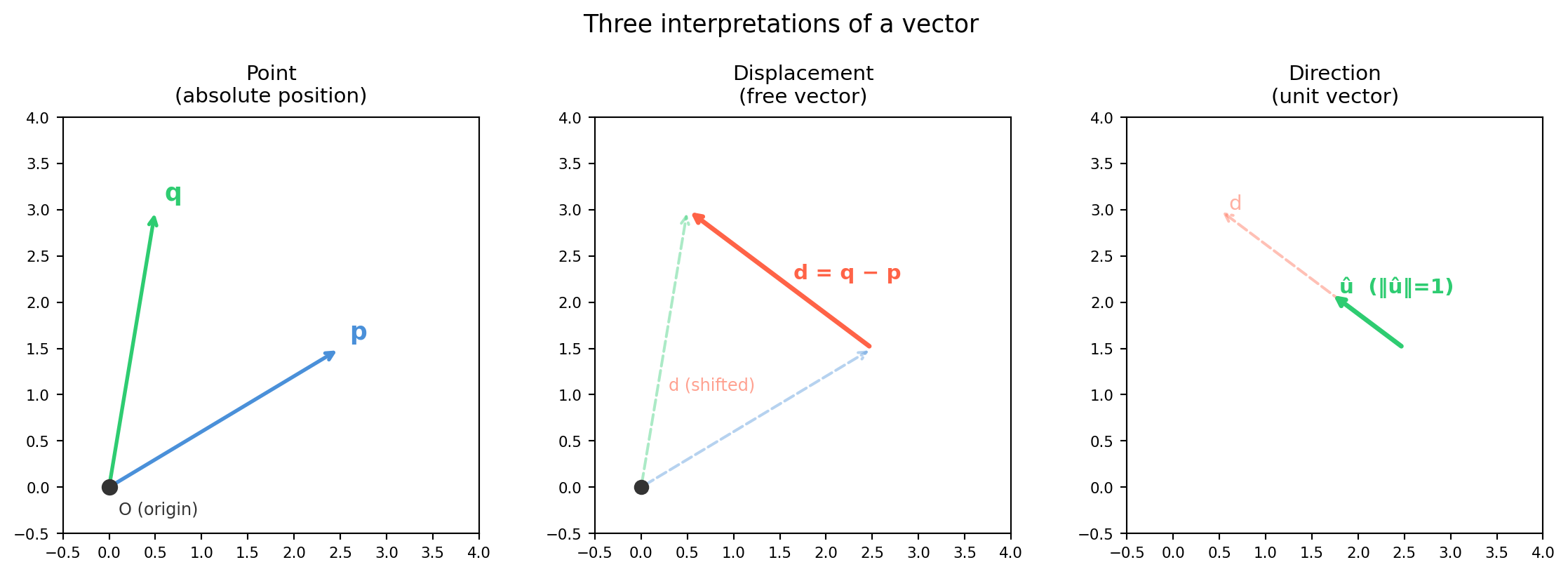
The word “vector” means different things depending on context — and getting this wrong causes subtle bugs in 3D graphics and robotics. A 3-tuple \((x, y, z)\) can represent:
Interpretation
Meaning
Transforms under rotation \(R\) as
Point (position)
A location in space
\(R\mathbf{p} + \mathbf{t}\) (rotate and translate)
\(R\hat{\mathbf{u}}\) (same as displacement; \(\|\hat{\mathbf{u}}\|=1\) preserved)
Chapter 9 will make this precise with SE(3) and homogeneous coordinates. For now, the key habit: always know which interpretation you intend.
4.1.1 Points and Displacements in ℝⁿ
A point\(\mathbf{p} \in \mathbb{R}^n\) specifies a location relative to some origin. Its numerical values depend on where the origin is.
A displacement\(\mathbf{d} = \mathbf{q} - \mathbf{p}\) is the difference of two points. Displacements are free vectors — shifting the origin does not change \(\mathbf{d}\).
Directions appear in: - Surface normals (Ch 4.3, App) - Axis of rotation in Rodrigues’ formula (Ch 8) - Principal directions from SVD (Ch 18) - Camera viewing rays (Ch 10)
import numpy as npd = np.array([3.0, -4.0, 0.0])norm_d = np.linalg.norm(d)u_hat = d / norm_dprint(f"d = {d}")print(f"‖d‖ = {norm_d:.4f}")print(f"û = {u_hat}")print(f"‖û‖ = {np.linalg.norm(u_hat):.10f} (should be 1.0)")
d     = [ 3. -4.  0.]
‖d‖   = 5.0000
û     = [ 0.6 -0.8  0. ]
‖û‖   = 1.0000000000  (should be 1.0)
Pitfall — zero-length vectors. Normalizing a zero vector produces nan. Always guard in production code:
def safe_normalize(v, tol=1e-12):"""Return unit vector, or zero if v is too short.""" n = np.linalg.norm(v)return v / n if n > tol else np.zeros_like(v)
4.1.3 Standard Basis Vectors
The standard basis of \(\mathbb{R}^n\) consists of unit vectors along each axis:
The 1 vs. 0 in the last slot is what causes the translation to apply (or not) when you multiply by the 4×4 homogeneous matrix.
import numpy as np# 2D example with homogeneous coordinates# Rotation by 90°, translation by [3, 1]theta = np.pi /2R2 = np.array([[np.cos(theta), -np.sin(theta)], [np.sin(theta), np.cos(theta)]])t = np.array([3.0, 1.0])T_hom = np.eye(3)T_hom[:2, :2] = R2T_hom[:2, 2] = tp_h = np.array([1.0, 0.0, 1.0]) # point at (1,0), last component = 1d_h = np.array([1.0, 0.0, 0.0]) # direction along x, last component = 0p_transformed = T_hom @ p_hd_transformed = T_hom @ d_hprint(f"Homogeneous transform T:\n{T_hom}")print(f"\nPoint (1,0): {p_h[:2]} → {p_transformed[:2]}")print(f" (rotated AND translated)")print(f"\nDirection (1,0): {d_h[:2]} → {d_transformed[:2]}")print(f" (rotated only — last 0 blocks translation)")
Homogeneous transform T:
[[ 6.123234e-17 -1.000000e+00  3.000000e+00]
 [ 1.000000e+00  6.123234e-17  1.000000e+00]
 [ 0.000000e+00  0.000000e+00  1.000000e+00]]

Point (1,0):   [1. 0.] → [3. 2.]
  (rotated AND translated)

Direction (1,0): [1. 0.] → [6.123234e-17 1.000000e+00]
  (rotated only — last 0 blocks translation)
4.2 Dot Product, Angle, and Cosine Similarity
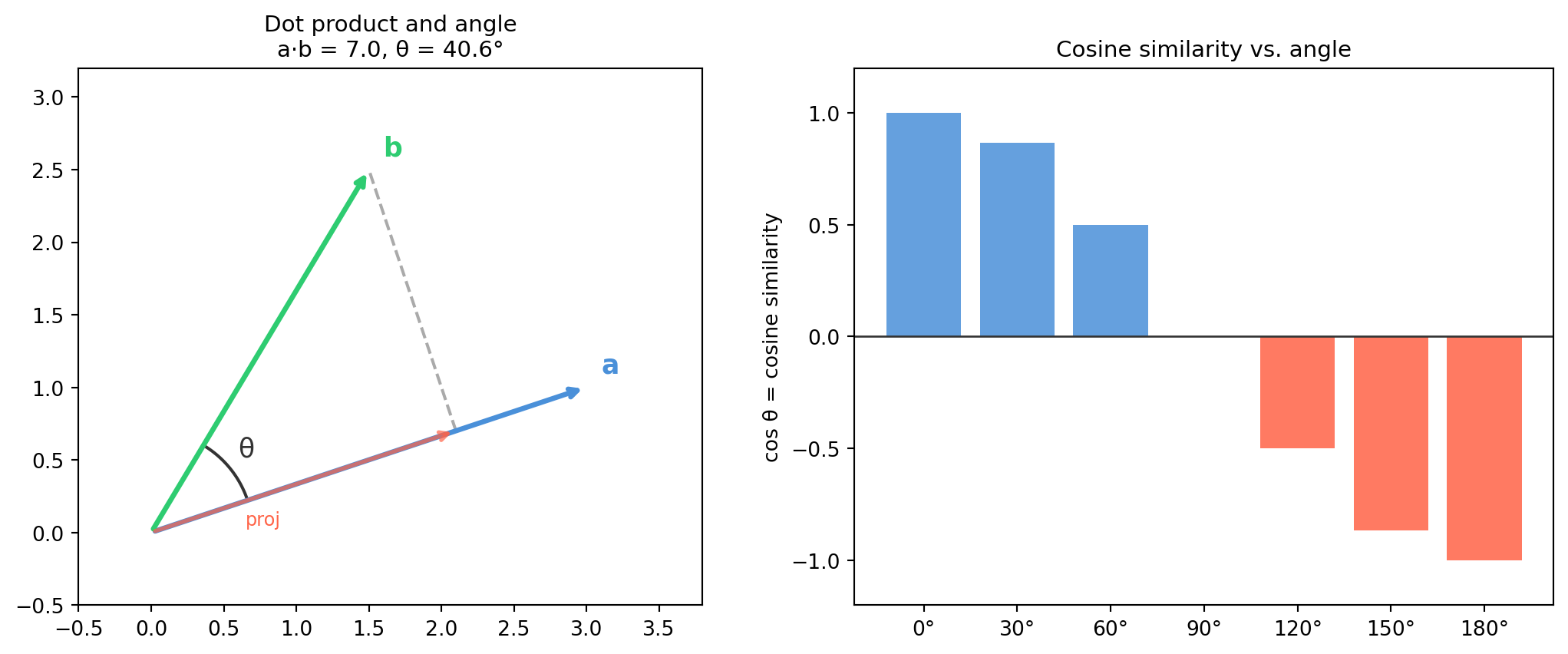
The dot product is the workhorse of inner products. It computes in \(O(n)\) time and underlies projection, similarity search, neural network layers, and the definition of angles in any dimension.
If you have \(m\) query vectors (rows of \(Q \in \mathbb{R}^{m\times n}\)) and \(k\) database vectors (rows of \(D \in \mathbb{R}^{k\times n}\)), all pairwise dot products are:
\[S = Q D^T \in \mathbb{R}^{m \times k}\]
This is the central computation in approximate nearest-neighbor search, attention mechanisms in transformers, and feature correlation in CV.
import numpy as np# 3 queries, 5 database vectors, 4-dimensional embeddingsrng = np.random.default_rng(0)Q = rng.standard_normal((3, 4))D = rng.standard_normal((5, 4))# Normalize for cosine similarityQ_n = Q / np.linalg.norm(Q, axis=1, keepdims=True)D_n = D / np.linalg.norm(D, axis=1, keepdims=True)S = Q_n @ D_n.T # shape (3, 5)print(f"Similarity matrix shape: {S.shape}")print("Nearest neighbor for each query (index of max similarity):")for i inrange(3): best = np.argmax(S[i])print(f" Query {i}: best match is DB[{best}], sim = {S[i, best]:.4f}")
Similarity matrix shape: (3, 5)
Nearest neighbor for each query (index of max similarity):
  Query 0: best match is DB[1], sim = 0.3997
  Query 1: best match is DB[1], sim = 0.7622
  Query 2: best match is DB[0], sim = 0.6141
Equality holds if and only if \(\mathbf{a}\) and \(\mathbf{b}\) are parallel (one is a scalar multiple of the other). This is what guarantees \(\cos\theta\) is always in \([-1, 1]\) — the inequality says the dot product can never exceed the product of the norms.
import numpy as nprng = np.random.default_rng(42)n =100# Test Cauchy-Schwarz on random vectorsfor _ inrange(5): a = rng.standard_normal(n) b = rng.standard_normal(n) lhs =abs(np.dot(a, b)) rhs = np.linalg.norm(a) * np.linalg.norm(b)print(f"|a·b| = {lhs:.4f} ≤ ‖a‖‖b‖ = {rhs:.4f} ✓ {lhs <= rhs +1e-12}")
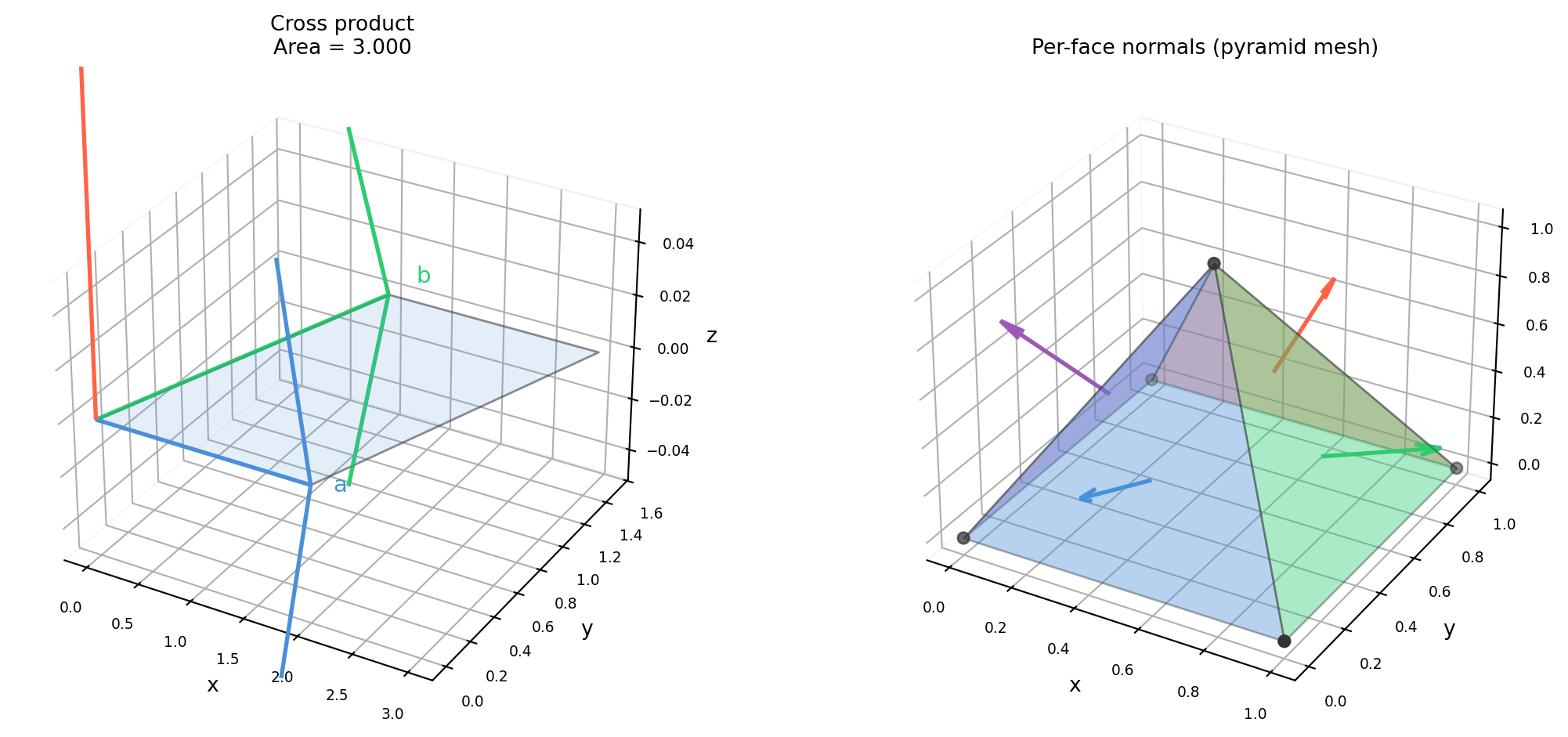
The cross product is unique to \(\mathbb{R}^3\) (and, in a generalized sense, \(\mathbb{R}^7\)). It produces a vector perpendicular to both inputs, with magnitude equal to the area of the parallelogram they span. In robotics and computer vision it appears everywhere: surface normals, torque, angular velocity, and the essential matrix in epipolar geometry.
import numpy as npa = np.array([1.0, 0.0, 0.0]) # x-axisb = np.array([0.0, 1.0, 0.0]) # y-axisc = np.cross(a, b) # should be z-axis = [0, 0, 1]print(f"a × b = {c} (right-hand rule: x × y = z)")print(f"b × a = {np.cross(b, a)} (anti-symmetry: y × x = -z)")print(f"‖a × b‖ = {np.linalg.norm(c):.4f} (= area of unit square)")# General casea2 = np.array([2.0, 1.0, 0.0])b2 = np.array([1.0, 2.0, 0.0])c2 = np.cross(a2, b2)area = np.linalg.norm(c2)theta = np.arcsin(area / (np.linalg.norm(a2) * np.linalg.norm(b2)))print(f"\na2 = {a2}, b2 = {b2}")print(f"a2 × b2 = {c2}")print(f"Parallelogram area = {area:.4f}")print(f"θ = {np.degrees(theta):.2f}°")# Verify orthogonalityprint(f"\nOrthogonality checks:")print(f" (a2 × b2) · a2 = {np.dot(c2, a2):.10f}")print(f" (a2 × b2) · b2 = {np.dot(c2, b2):.10f}")
a × b = [0. 0. 1.]   (right-hand rule: x × y = z)
b × a = [ 0.  0. -1.]   (anti-symmetry: y × x = -z)
‖a × b‖ = 1.0000  (= area of unit square)

a2 = [2. 1. 0.], b2 = [1. 2. 0.]
a2 × b2 = [0. 0. 3.]
Parallelogram area = 3.0000
θ = 36.87°

Orthogonality checks:
  (a2 × b2) · a2 = 0.0000000000
  (a2 × b2) · b2 = 0.0000000000
4.3.2 Right-Hand Rule
The direction of \(\mathbf{a} \times \mathbf{b}\) follows the right-hand rule: curl the fingers of your right hand from \(\mathbf{a}\) toward \(\mathbf{b}\); the thumb points in the direction of the cross product.
(Cyclic: \(1\to2\to3\to1\); reversing any pair negates the result.)
4.3.3 Skew-Symmetric Matrix Form
The cross product \(\mathbf{a} \times \mathbf{b}\) is linear in \(\mathbf{b}\), so it can be written as matrix multiplication. Define the skew-symmetric (or “hat”) matrix of \(\mathbf{a}\):
The magnitude \(\|\mathbf{n}\|\) equals the triangle area; \(\hat{\mathbf{n}} = \mathbf{n}/\|\mathbf{n}\|\) is the unit normal.
import numpy as npdef triangle_normal(v0, v1, v2, normalize=True):""" Compute the outward normal of a triangle. Vertex order (CCW when viewed from outside) follows right-hand rule. Returns (normal, area). """ e1 = v1 - v0 e2 = v2 - v0 n = np.cross(e1, e2) area = np.linalg.norm(n) /2.0if normalize: n = n / np.linalg.norm(n)return n, area# Unit square in the xy-plane (z=0), CCW from abovev0 = np.array([0.0, 0.0, 0.0])v1 = np.array([1.0, 0.0, 0.0])v2 = np.array([0.0, 1.0, 0.0])n, area = triangle_normal(v0, v1, v2)print(f"Triangle vertices: {v0}, {v1}, {v2}")print(f"Normal: {n} (pointing in +z, as expected)")print(f"Area: {area:.4f} m² (half of 1×1 square)")# Tilted trianglev0t = np.array([0., 0., 0.])v1t = np.array([2., 0., 0.])v2t = np.array([0., 2., 1.])n_tilt, area_tilt = triangle_normal(v0t, v1t, v2t)print(f"\nTilted triangle normal: {n_tilt.round(4)}")print(f"Tilt area: {area_tilt:.4f} m²")
Triangle vertices: [0. 0. 0.], [1. 0. 0.], [0. 1. 0.]
Normal:  [0. 0. 1.]   (pointing in +z, as expected)
Area:    0.5000 m²  (half of 1×1 square)

Tilted triangle normal: [ 0.     -0.4472  0.8944]
Tilt area:              2.2361 m²
4.3.5 Mesh Face Normals
Real meshes have thousands of triangles. Vectorized computation is critical.
import numpy as npdef mesh_face_normals(vertices, faces):""" Compute per-face normals for a triangle mesh. vertices: (V, 3) array of vertex positions faces: (F, 3) array of vertex indices Returns: (F, 3) unit normals, (F,) face areas """ v0 = vertices[faces[:, 0]] v1 = vertices[faces[:, 1]] v2 = vertices[faces[:, 2]] e1 = v1 - v0 # (F, 3) e2 = v2 - v0 # (F, 3) normals = np.cross(e1, e2) # (F, 3) magnitudes = np.linalg.norm(normals, axis=1, keepdims=True) # (F, 1) areas = magnitudes.flatten() /2.0 unit_normals = normals / np.maximum(magnitudes, 1e-12) # avoid /0return unit_normals, areas# Toy mesh: a box-like structure (4 triangles of a simple surface)vertices = np.array([ [0., 0., 0.], [1., 0., 0.], [1., 1., 0.], [0., 1., 0.], [0.5, 0.5, 1.], # apex], dtype=float)faces = np.array([ [0, 1, 4], [1, 2, 4], [2, 3, 4], [3, 0, 4],], dtype=int)normals, areas = mesh_face_normals(vertices, faces)print(f"Face normals (shape {normals.shape}):")for i, (n, a) inenumerate(zip(normals, areas)):print(f" Face {i}: normal = {n.round(4)}, area = {a:.4f}")
Face normals (shape (4, 3)):
  Face 0: normal = [ 0.     -0.8944  0.4472],  area = 0.5590
  Face 1: normal = [ 0.8944 -0.      0.4472],  area = 0.5590
  Face 2: normal = [0.     0.8944 0.4472],  area = 0.5590
  Face 3: normal = [-0.8944  0.      0.4472],  area = 0.5590
Torque:\(\boldsymbol{\tau} = \mathbf{r} \times \mathbf{F}\) — the cross product of the moment arm and force. The direction of \(\boldsymbol{\tau}\) gives the rotation axis; the magnitude gives the twisting strength.
Angular velocity: If a rigid body rotates with angular velocity \(\boldsymbol{\omega}\), the velocity of a point at position \(\mathbf{r}\) (relative to the rotation center) is:
import numpy as np# Torque example: force applied at end of a wrenchr = np.array([0.3, 0.0, 0.0]) # 0.3 m moment arm along xF = np.array([0.0, 0.0, 10.0]) # 10 N force in ztau = np.cross(r, F)print(f"r = {r} m")print(f"F = {F} N")print(f"τ = r × F = {tau} N·m")print(f"‖τ‖ = {np.linalg.norm(tau):.2f} N·m")# Angular velocity exampleomega = np.array([0., 0., 1.0]) # 1 rad/s rotation about zr_pt = np.array([2.0, 0., 0.]) # point on rim at radius 2v = np.cross(omega, r_pt)print(f"\nAngular velocity ω = {omega} rad/s")print(f"Point at r = {r_pt}")print(f"Linear velocity v = ω × r = {v} (tangential, in y-direction)")print(f"Speed: {np.linalg.norm(v):.4f} m/s (= ω × radius = 1×2)")
r = [0.3 0.  0. ] m
F = [ 0.  0. 10.] N
τ = r × F = [ 0. -3.  0.] N·m
‖τ‖ = 3.00 N·m

Angular velocity ω = [0. 0. 1.] rad/s
Point at r = [2. 0. 0.]
Linear velocity v = ω × r = [0. 2. 0.]  (tangential, in y-direction)
Speed: 2.0000 m/s  (= ω × radius = 1×2)
4.4 Span, Basis, and Dimension
Span, basis, and dimension formalize intuitions you already have: “what directions can I reach?”, “what is the minimal description?”, and “how many degrees of freedom does this space have?” These concepts underlie every subspace result in the book.
4.4.1 Span: The Reachable Set
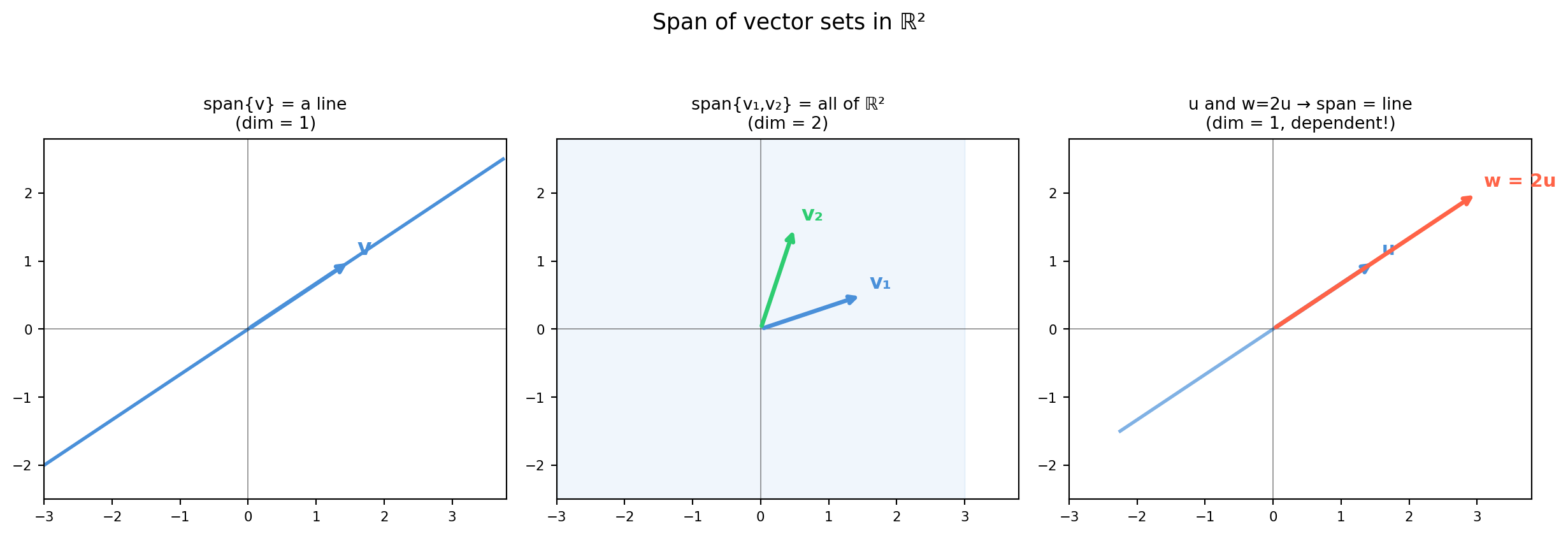
The span of a set of vectors \(\{\mathbf{v}_1, \ldots, \mathbf{v}_k\} \subset \mathbb{R}^n\) is the set of all their linear combinations:
The span is always a subspace (closed under addition and scalar multiplication).
Vectors
Span
\(\{[1,0]^T\}\)
The \(x\)-axis (a line through the origin)
\(\{[1,0]^T, [0,1]^T\}\)
All of \(\mathbb{R}^2\) (the full plane)
\(\{[1,0,0]^T, [0,1,0]^T\}\)
The \(xy\)-plane in \(\mathbb{R}^3\)
\(\{[1,2]^T, [2,4]^T\}\)
Only the line \(y = 2x\) (vectors are parallel)
Does \(\mathbf{b}\) lie in the span of \(\{\mathbf{v}_1,\ldots,\mathbf{v}_k\}\)? Stack the \(\mathbf{v}_i\) as columns: \(A = [\mathbf{v}_1 \cdots \mathbf{v}_k]\). Then \(\mathbf{b} \in \text{span}\) iff \(A\mathbf{x} = \mathbf{b}\) is consistent, i.e., \(\text{rank}(A) = \text{rank}([A|\mathbf{b}])\).
import numpy as np# Can b = [3, 5] be written as c1*v1 + c2*v2?v1 = np.array([1.0, 2.0])v2 = np.array([2.0, 1.0])b = np.array([3.0, 5.0])A = np.column_stack([v1, v2]) # 2×2A_aug = np.column_stack([A, b])r_A = np.linalg.matrix_rank(A)r_aug = np.linalg.matrix_rank(A_aug)print(f"rank(A) = {r_A}, rank([A|b]) = {r_aug}")if r_A == r_aug: c = np.linalg.solve(A, b)print(f"b IS in span: b = {c[0]:.3f}*v1 + {c[1]:.3f}*v2")print(f"Check: {c[0]}*{v1} + {c[1]}*{v2} = {c[0]*v1 + c[1]*v2}")else:print("b is NOT in span")# Non-spanning case: parallel vectorsv3 = np.array([2.0, 4.0]) # = 2*v1A2 = np.column_stack([v1, v3])A2_aug = np.column_stack([A2, b])print(f"\nWith v1 parallel to v3: rank(A) = {np.linalg.matrix_rank(A2)}, "f"rank([A|b]) = {np.linalg.matrix_rank(A2_aug)}")print("→ b is NOT in span of v1 and 2*v1 (they only span the line y=2x)")
rank(A) = 2, rank([A|b]) = 2
b IS in span: b = 2.333*v1 + 0.333*v2
Check: 2.3333333333333335*[1. 2.] + 0.3333333333333333*[2. 1.] = [3. 5.]

With v1 parallel to v3: rank(A) = 1, rank([A|b]) = 2
→ b is NOT in span of v1 and 2*v1 (they only span the line y=2x)
4.4.2 Linear Independence
A set \(\{\mathbf{v}_1, \ldots, \mathbf{v}_k\}\) is linearly independent if the only solution to \(c_1\mathbf{v}_1 + \cdots + c_k\mathbf{v}_k = \mathbf{0}\) is \(c_1 = \cdots = c_k = 0\).
Equivalently, no vector in the set lies in the span of the others.
Test: Form \(A = [\mathbf{v}_1 \cdots \mathbf{v}_k]\). The set is linearly independent iff \(\text{rank}(A) = k\) (no free columns).
Intuition: redundant vectors add no new “directions” to the span. Dropping them does not shrink the span.
import numpy as npdef is_independent(vectors):"""Test if a list of vectors is linearly independent.""" A = np.column_stack(vectors)return np.linalg.matrix_rank(A) == A.shape[1]# Independent set in R^3u1 = np.array([1., 0., 0.])u2 = np.array([0., 1., 0.])u3 = np.array([0., 0., 1.])print(f"{{e1, e2, e3}} independent: {is_independent([u1, u2, u3])}")# Dependent: third is a combination of first twow1 = np.array([1., 2., 3.])w2 = np.array([4., 5., 6.])w3 = w1 + w2 # redundantprint(f"{{w1, w2, w1+w2}} independent: {is_independent([w1, w2, w3])}")# More than n vectors in R^n — always dependentextra = [np.random.randn(3) for _ inrange(5)] # 5 vectors in R^3print(f"5 random vectors in R^3 independent: {is_independent(extra)}")print(" (impossible — max independent set in R^3 has 3 vectors)")
{e1, e2, e3} independent: True
{w1, w2, w1+w2} independent: False
5 random vectors in R^3 independent: False
  (impossible — max independent set in R^3 has 3 vectors)
4.4.3 Basis
A basis for a subspace \(V\) is a set that is: 1. Linearly independent, and 2. Spans\(V\) (every vector in \(V\) is a linear combination of the basis vectors).
A basis is a minimal spanning set — the “most efficient” description of the space.
Key facts: - Every basis for \(V\) has the same number of vectors (proved in Ch 5). - You can always expand or shrink a spanning set to get a basis. - The standard basis \(\{\mathbf{e}_1,\ldots,\mathbf{e}_n\}\) is the canonical basis of \(\mathbb{R}^n\).
import numpy as npimport sympydef find_basis(vectors):""" Extract a basis (maximally independent subset) from a list of vectors. Returns indices of basis vectors. """ A = np.column_stack(vectors) _, pivot_cols = sympy.Matrix(A.tolist()).rref()returnlist(pivot_cols)# Five vectors in R^3 — find a basis subsetvs = [ np.array([1., 2., 3.]), np.array([2., 4., 6.]), # = 2 * vs[0] — redundant np.array([0., 1., 2.]), np.array([1., 3., 5.]), # = vs[0] + vs[2] — redundant np.array([0., 0., 1.]),]basis_idx = find_basis(vs)print(f"Basis indices: {basis_idx}")print(f"Basis vectors:")for i in basis_idx:print(f" v[{i}] = {vs[i]}")# Verify: the selected vectors are independent and span the same spaceA_full = np.column_stack(vs)A_basis = np.column_stack([vs[i] for i in basis_idx])print(f"\nrank(all vectors) = {np.linalg.matrix_rank(A_full)}")print(f"rank(basis) = {np.linalg.matrix_rank(A_basis)}")print(f"Span is the same: {np.linalg.matrix_rank(A_full) == np.linalg.matrix_rank(A_basis)}")
The dimension of a subspace \(V\), written \(\dim(V)\), is the number of vectors in any basis for \(V\).
Space
Dimension
Physical interpretation
\(\{0\}\)
0
Just the zero vector
A line through the origin
1
One direction of motion
A plane through the origin
2
Two independent directions
\(\mathbb{R}^n\)
\(n\)
Full freedom
Column space of \(A\)
\(\text{rank}(A)\)
Reachable outputs
Null space of \(A\)
\(n - \text{rank}(A)\)
Self-motions / free parameters
Dimension is the intrinsic complexity of a space — independent of how it is embedded or which coordinates are used.
Why this matters for ML: A dataset living on a low-dimensional manifold (e.g., images of the same face under varying lighting) has high-dimensional coordinates but low intrinsic dimension. PCA (Ch 20) finds bases for these low-dimensional subspaces.
import numpy as np# Rank = dimension of column spaceA_full = np.random.randn(10, 5) # generic 10×5 — rank 5A_lowrk = np.random.randn(10, 2) @ np.random.randn(2, 5) # rank ≤ 2print(f"Full matrix (10×5): rank = {np.linalg.matrix_rank(A_full)}")print(f"Low-rank (10×5, r=2): rank = {np.linalg.matrix_rank(A_lowrk)}")# Dimension of null space from rank-nullityn =5print(f"\nFor the low-rank matrix:")print(f" rank = {np.linalg.matrix_rank(A_lowrk)}")print(f" nullity = n - rank = {n - np.linalg.matrix_rank(A_lowrk)}")print(f" (3 free parameters — 3-dimensional solution family)")
Full matrix (10×5):    rank = 5
Low-rank (10×5, r=2):  rank = 2

For the low-rank matrix:
  rank = 2
  nullity = n - rank = 3
  (3 free parameters — 3-dimensional solution family)
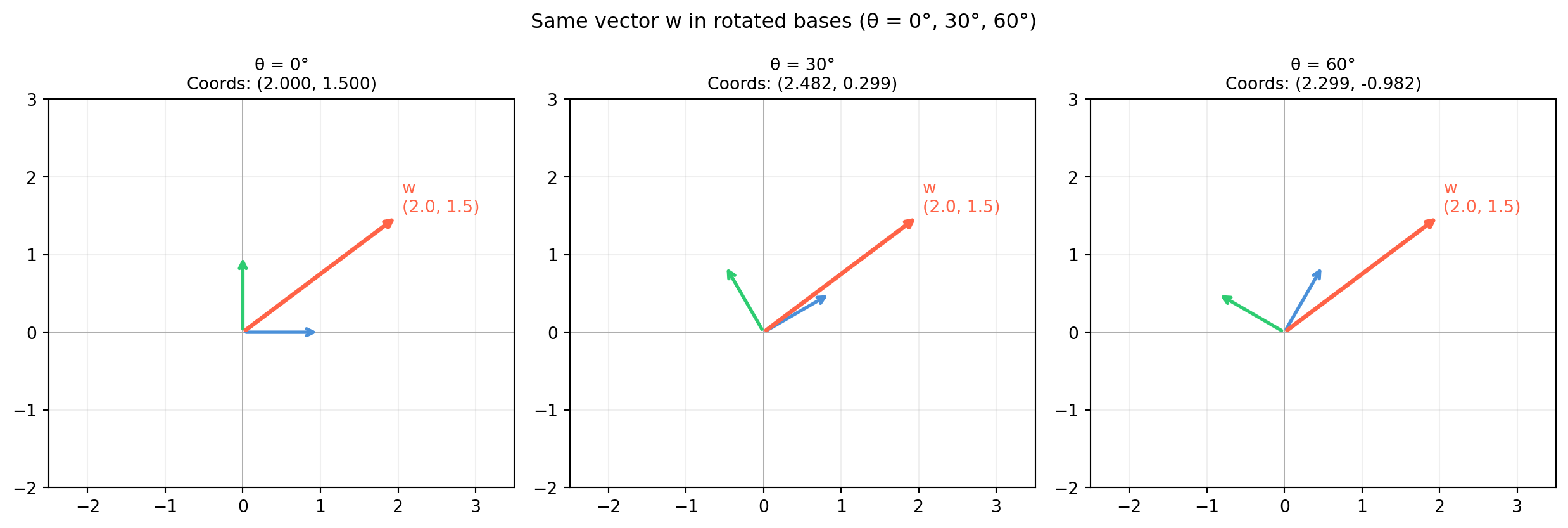
Once you have a basis, every vector has a unique coordinate representation. Changing the basis changes the coordinates but not the underlying geometric object. This duality — same geometry, different numbers — is the foundation of all frame conversions in robotics, camera calibration, and signal processing.
4.5.1 Linear Combinations
A linear combination of vectors \(\mathbf{v}_1, \ldots, \mathbf{v}_k\) is:
In matrix form, this is \(A\mathbf{c}\) where \(A = [\mathbf{v}_1 \cdots \mathbf{v}_k]\) and \(\mathbf{c} = [c_1, \ldots, c_k]^T\). The column space of \(A\) is exactly the set of all linear combinations of the columns.
import numpy as np# Basis vectors for a 2D planeb1 = np.array([2.0, 1.0])b2 = np.array([-1.0, 2.0])# Coefficients (coordinates in the {b1, b2} basis)c = np.array([3.0, -1.0])# Reconstruct the vectorB = np.column_stack([b1, b2]) # basis matrixw = B @ cprint(f"3·b1 + (-1)·b2 = 3·{b1} + (-1)·{b2}")print(f" = {3*b1} + {-1*b2}")print(f" = {w}")print(f"Matrix form: B @ c = {B} @ {c} = {B @ c}")
Given a basis \(\mathcal{B} = \{\mathbf{b}_1, \ldots, \mathbf{b}_n\}\) for \(\mathbb{R}^n\) and a vector \(\mathbf{w}\), the coordinates of \(\mathbf{w}\) in basis \(\mathcal{B}\) are the unique scalars \([c_1, \ldots, c_n]\) such that:
In matrix form: \(\mathbf{w} = B\mathbf{c}\) where \(B = [\mathbf{b}_1 \cdots \mathbf{b}_n]\).
Therefore \(\mathbf{c} = B^{-1}\mathbf{w}\).
Uniqueness follows from linear independence of the basis: if two different coefficient vectors gave the same \(\mathbf{w}\), their difference would be a nontrivial solution to \(B\mathbf{c} = \mathbf{0}\), contradicting \(\det(B) \neq 0\).
import numpy as np# Non-standard basis (45° rotated + scaled)b1 = np.array([1.0, 1.0]) / np.sqrt(2) # unit vector at 45°b2 = np.array([-1.0, 1.0]) / np.sqrt(2) # unit vector at 135°B = np.column_stack([b1, b2])# Standard-basis vector we want to re-expressw = np.array([3.0, 1.0])# Coordinates in the B basisc = np.linalg.solve(B, w)print(f"w in standard basis: {w}")print(f"B basis vectors: b1 = {b1.round(4)}, b2 = {b2.round(4)}")print(f"Coordinates in B: c = {c.round(4)}")print(f"Reconstruction check: B @ c = {(B @ c).round(10)}")# Note: B is orthogonal here, so B^{-1} = B^Tc_fast = B.T @ wprint(f"Using B^T (orthogonal shortcut): c = {c_fast.round(4)}")
w in standard basis: [3. 1.]
B basis vectors: b1 = [0.7071 0.7071], b2 = [-0.7071  0.7071]
Coordinates in B:    c = [ 2.8284 -1.4142]
Reconstruction check: B @ c = [3. 1.]
Using B^T (orthogonal shortcut): c = [ 2.8284 -1.4142]
4.5.3 Change of Basis
Given two bases \(\mathcal{B}\) and \(\mathcal{C}\) for the same space, there is a unique invertible matrix \(P\) (the change-of-basis matrix from \(\mathcal{C}\) to \(\mathcal{B}\)) such that:
The columns of \(P\) are the \(\mathcal{C}\)-basis vectors expressed in the \(\mathcal{B}\) coordinate system.
In robotics, this is precisely a frame transformation: converting coordinates from one sensor frame to another. The basis vectors of the source frame, expressed in the target frame, form the columns of the rotation matrix.
import numpy as np# Two sensor frames in 2D# Frame A = standard frame# Frame B = rotated 30° counterclockwisetheta = np.radians(30)R_A_to_B = np.array([[ np.cos(theta), np.sin(theta)], [-np.sin(theta), np.cos(theta)]]) # rows are B-axes in A# A point measured in frame Ap_A = np.array([2.0, 1.0])# Express in frame Bp_B = R_A_to_B @ p_Aprint(f"Point in frame A: {p_A}")print(f"Point in frame B: {p_B.round(4)}")# And backp_A_back = R_A_to_B.T @ p_B # R is orthogonal → R^{-1} = R^Tprint(f"Back to frame A: {p_A_back.round(10)}")# General basis change: from basis B to basis C# Columns of B_mat = B basis vectors in standard coordsB_mat = np.column_stack([np.array([1., 0.]), np.array([1., 1.])])C_mat = np.column_stack([np.array([2., 1.]), np.array([-1., 1.])])P_B_to_C = np.linalg.solve(C_mat, B_mat) # C_mat @ P = B_matprint(f"\nChange-of-basis matrix (B→C):\n{P_B_to_C.round(4)}")
Point in frame A: [2. 1.]
Point in frame B: [ 2.2321 -0.134 ]
Back to frame A:  [2. 1.]

Change-of-basis matrix (B→C):
[[ 0.3333  0.6667]
 [-0.3333  0.3333]]
4.5.4 Affine Combinations and Convex Hulls
When the coefficients sum to 1, the linear combination becomes an affine combination — a generalization of “weighted average” that preserves location rather than direction:
When additionally all \(c_i \geq 0\), this is a convex combination, and \(\mathbf{w}\) lies inside the convex hull of the \(\mathbf{p}_i\).
Applications: barycentric coordinates in triangle rendering, interpolation of robot waypoints, linear blending of mesh shapes.
import numpy as npimport matplotlib.pyplot as plt# Triangle with vertices A, B, CA = np.array([0.0, 0.0])B = np.array([4.0, 0.0])C = np.array([1.5, 3.0])# Barycentric coordinates: w = alpha*A + beta*B + gamma*C, alpha+beta+gamma=1# A point inside the trianglealpha, beta, gamma =0.3, 0.5, 0.2assertabs(alpha + beta + gamma -1.0) <1e-12p = alpha * A + beta * B + gamma * Cprint(f"Triangle vertices: A={A}, B={B}, C={C}")print(f"Barycentric coords: alpha={alpha}, beta={beta}, gamma={gamma}")print(f"Point p = {p}")# Edge midpoints (alpha=beta=0.5, gamma=0) -- affine but not always convexmid_AB =0.5* A +0.5* B +0.0* Cprint(f"Midpoint of AB: {mid_AB} (affine combination with gamma=0)")# Outside the triangle: negative barycentric coordp_outside =-0.2* A +0.8* B +0.4* C # sums to 1 but alpha < 0print(f"\nOutside point: {p_outside} (affine but not convex: alpha = -0.2 < 0)")
Triangle vertices: A=[0. 0.], B=[4. 0.], C=[1.5 3. ]
Barycentric coords: alpha=0.3, beta=0.5, gamma=0.2
Point p = [2.3 0.6]
Midpoint of AB: [2. 0.]  (affine combination with gamma=0)

Outside point: [3.8 1.2]  (affine but not convex: alpha = -0.2 < 0)
4.5.5 Coordinates as the Bridge Between Geometry and Numbers
The coordinate map \(\mathbf{w} \mapsto B^{-1}\mathbf{w}\) is an isomorphism — it preserves all linear-algebraic structure (addition, scalar multiplication) while changing which numbers represent the vectors. This is the central insight:
Choosing a basis = choosing a language. Geometry is the underlying reality.
This perspective appears explicitly in: - Ch 6:\([T]_{\mathcal{B}} = P^{-1}[T]_{\mathcal{E}}P\) — the same transformation represented in different coordinates - Ch 8: The columns of a rotation matrix \(R\) are the body-frame axes expressed in the world frame - Ch 14: Diagonalization \(A = P\Lambda P^{-1}\) — changing to the eigenvector basis where \(A\) acts by scaling only - Ch 20: PCA finds the basis in which data variance is maximized
import numpy as np# Toy demonstration: a linear map T has simple form in one basis# T: x → [3x1, 2x2] in standard basis (diagonal!)T_standard = np.array([[3., 0.], [0., 2.]])# In a different basis B = [[1,1],[1,-1]]B = np.array([[1., 1.], [1., -1.]])P_inv = np.linalg.inv(B)T_B = P_inv @ T_standard @ B # T represented in basis Bprint(f"T in standard basis:\n{T_standard}")print(f"\nT in basis B:\n{T_B.round(6)}")print("\n(Less clean — the diagonal basis was standard here)")# But if T is NOT diagonal, find the 'right' basis (Ch 14: diagonalization)T_messy = np.array([[2., 1.], [0., 3.]])eigenvalues, eigenvectors = np.linalg.eig(T_messy)print(f"\nMessy T:\n{T_messy}")print(f"Eigenvalues: {eigenvalues}")print(f"In eigenvector basis, T acts as diag({eigenvalues})")
T in standard basis:
[[3. 0.]
 [0. 2.]]

T in basis B:
[[2.5 0.5]
 [0.5 2.5]]

(Less clean — the diagonal basis was standard here)

Messy T:
[[2. 1.]
 [0. 3.]]
Eigenvalues: [2. 3.]
In eigenvector basis, T acts as diag([2. 3.])
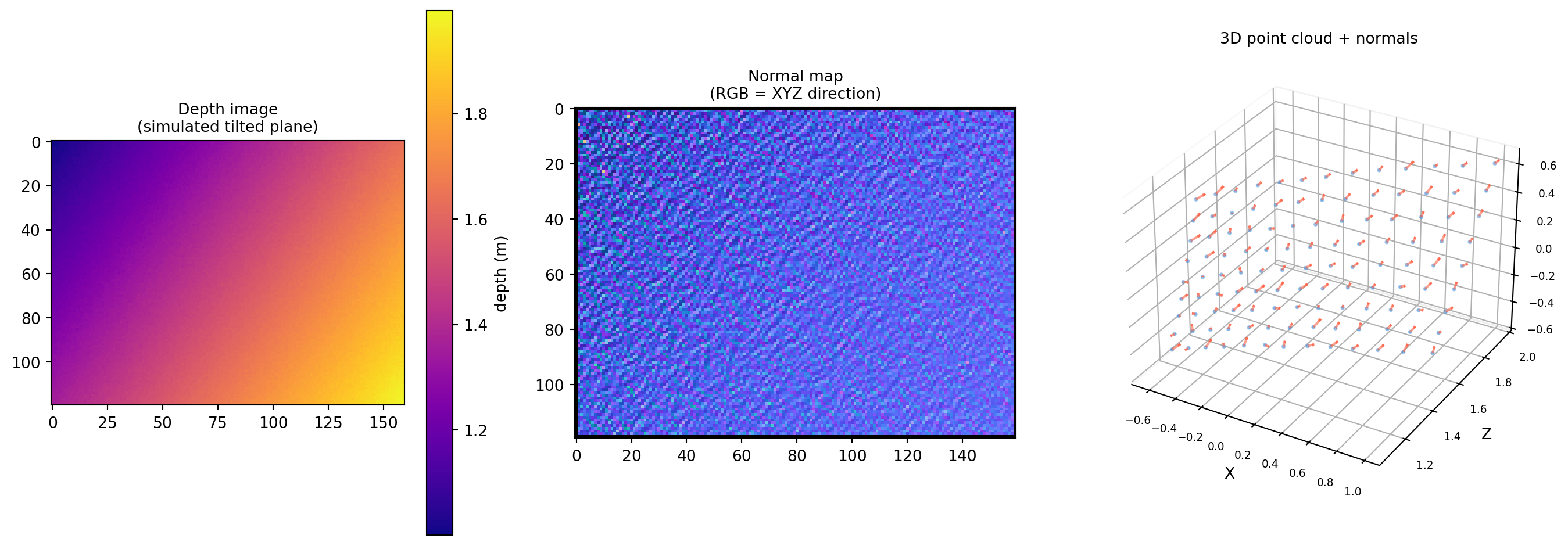
Depth cameras (Intel RealSense, Azure Kinect, structured-light scanners) return a 2D array of depth values — one depth per pixel. Lifting this to 3D and estimating surface normals is a core preprocessing step for object detection, grasping, segmentation, and surface reconstruction. The math is exactly the cross product of §4.3.
4.6.1 From Depth Image to 3D Points
A pinhole camera with focal length \(f\) and principal point \((c_x, c_y)\) maps pixel \((u, v)\) with depth \(d\) to 3D camera-frame coordinates:
4.6.4 Normal Quality: Curvature and Edge Artifacts
Near depth discontinuities (object edges), the central-difference neighbors straddle a depth jump, producing garbage normals. A simple fix: mask out pixels where the depth difference exceeds a threshold.
import numpy as npdef filter_edge_normals(points, normals, max_depth_jump=0.1):""" Invalidate normals near depth edges. max_depth_jump : threshold in meters """ Z = points[..., 2]# Horizontal and vertical depth gradients (central difference) dZ_h = np.abs(Z[:, 2:] - Z[:, :-2]) # (H, W-2) dZ_v = np.abs(Z[2:, :] - Z[:-2, :]) # (H-2, W)# Any large jump in the 3×3 neighbourhood → invalid edge_h = dZ_h[1:-1, :] > max_depth_jump # (H-2, W-2) edge_v = dZ_v[:, 1:-1] > max_depth_jump # (H-2, W-2) edge_mask = edge_h | edge_v normals_filtered = normals.copy() normals_filtered[1:-1, 1:-1, :][edge_mask] = np.nanreturn normals_filterednormals_filtered = filter_edge_normals(points, normals, max_depth_jump=0.05)valid_after = (~np.isnan(normals_filtered[..., 0])).sum()valid_before = (~np.isnan(normals[..., 0])).sum()print(f"Normals before edge filter: {valid_before}")print(f"Normals after edge filter: {valid_after}")print(f"Removed as edge artifacts: {valid_before - valid_after}")
Normals before edge filter: 18644
Normals after  edge filter: 18644
Removed as edge artifacts:  0
4.6.5 PCA-Based Normal Estimation (More Robust)
For real noisy data, cross-product normals are sensitive to measurement noise. A more robust approach: for each point, collect its \(k\) nearest neighbors and fit a plane via PCA. The normal is the eigenvector of the covariance matrix corresponding to the smallest eigenvalue.
import numpy as npdef pca_normal(neighborhood):""" Estimate normal at a point from its neighborhood via PCA. neighborhood : (k, 3) array of nearby points Returns : (3,) unit normal """ centered = neighborhood - neighborhood.mean(axis=0) _, _, Vt = np.linalg.svd(centered, full_matrices=False)# Smallest singular value → last row of Vt → least-variance direction n = Vt[-1]return n if n[2] >0else-n # flip to face camera# Demonstrate on a 5×5 patch around the centerr =5# patch half-sizecy_int, cx_int = H //2, W //2patch = points[cy_int - r : cy_int + r +1, cx_int - r : cx_int + r +1, :].reshape(-1, 3)patch = patch[~np.isnan(patch[:, 0])] # remove NaNn_pca = pca_normal(patch)n_cross = normals[cy_int, cx_int]print(f"Cross-product normal (center): {n_cross.round(4)}")print(f"PCA normal (5×5 patch): {n_pca.round(4)}")angle = np.degrees(np.arccos(np.clip(np.dot(n_pca, n_cross), -1, 1)))print(f"Angular difference: {angle:.3f}°")
Cross-product normal (center): [-0.3874  0.2463  0.8884]
PCA normal (5×5 patch):        [-0.3384 -0.2807  0.8982]
Angular difference: 30.693°
4.6.6 Key Takeaways
Depth → 3D is a simple pinhole inversion: \((u,v,d) \mapsto (x,y,d)\) via the camera intrinsics \((f_x, f_y, c_x, c_y)\).
Per-pixel normals come directly from cross products of horizontal and vertical central-difference edge vectors.
Edge artifacts occur where central-difference neighbors span a depth discontinuity; simple depth-jump masking fixes most of them.
PCA normals aggregate a neighborhood to reduce noise — the eigenvector of smallest eigenvalue of the local covariance matrix.
All of this is just the cross product of §4.3 applied systematically to a regular 2D grid of 3D points.
4.7 Exercises
4.1 A robot arm moves from position \(\mathbf{p} = [1, 2, 0]^T\) to \(\mathbf{q} = [4, 2, 3]^T\) (meters). (a) Find the displacement \(\mathbf{d} = \mathbf{q} - \mathbf{p}\). (b) Find the unit direction \(\hat{\mathbf{d}}\). (c) A second copy of the arm starts at \(\mathbf{p}' = [10, 0, 0]^T\) and moves in the same direction for the same distance. Where does it end up?
4.2 Without Python, compute \(\mathbf{a}\cdot\mathbf{b}\), the angle \(\theta\) between them, and the vector projection of \(\mathbf{b}\) onto \(\mathbf{a}\), where: \[\mathbf{a} = \begin{pmatrix}3\\0\\4\end{pmatrix}, \quad \mathbf{b} = \begin{pmatrix}1\\2\\2\end{pmatrix}\]
4.3 Three vectors in \(\mathbb{R}^3\): \(\mathbf{u} = [1,0,0]^T\), \(\mathbf{v} = [0,1,0]^T\), \(\mathbf{w} = [1,1,1]^T\). (a) Are they linearly independent? Justify using rank. (b) What is the dimension of their span? (c) Is \(\mathbf{b} = [2, -1, 3]^T\) in their span? If so, find the coordinates.
4.4 Given a triangle with vertices: \[\mathbf{v}_0 = (0,0,0), \quad \mathbf{v}_1 = (3,0,0), \quad \mathbf{v}_2 = (0,4,0)\] (a) Compute the unit normal vector by hand. (b) Compute the triangle area. (c) Verify with Python.
4.5 You are given a basis \(\mathcal{B} = \{\mathbf{b}_1, \mathbf{b}_2\}\) where \(\mathbf{b}_1 = [1, 1]^T\) and \(\mathbf{b}_2 = [1, -1]^T\). (a) Express \(\mathbf{w} = [3, 1]^T\) as a linear combination of \(\mathbf{b}_1\) and \(\mathbf{b}_2\). (b) What are the coordinates of \(\mathbf{w}\) in basis \(\mathcal{B}\)? (c) Verify that \(\mathbf{b}_1\) and \(\mathbf{b}_2\) are orthogonal.
4.6 The cosine similarity between two document embeddings is \(0.92\). A colleague says: “These two documents are 92% identical.” Explain what cosine similarity actually measures and why this interpretation is wrong. What does a similarity of \(0\) mean, and when could it be misleading?
4.7(Harder) Prove that if \(\mathbf{a}\times\mathbf{b} = \mathbf{0}\) and both \(\mathbf{a}, \mathbf{b}\) are nonzero, then \(\mathbf{a}\) and \(\mathbf{b}\) are linearly dependent. (Hint: use the magnitude formula \(\|\mathbf{a}\times\mathbf{b}\| = \|\mathbf{a}\|\|\mathbf{b}\|\sin\theta\).)
(c) Move from \(\mathbf{p}'\) in the same direction for the same distance: \[\mathbf{q}' = \mathbf{p}' + \mathbf{d} = \begin{pmatrix}10\\0\\0\end{pmatrix} + \begin{pmatrix}3\\0\\3\end{pmatrix} = \begin{pmatrix}13\\0\\3\end{pmatrix}\]
Displacements are translation-invariant: \(\mathbf{d}\) is the same free vector regardless of starting point.
(a) Form \(A = [\mathbf{u},\mathbf{v},\mathbf{w}]\): \[A = \begin{pmatrix}1&0&1\\0&1&1\\0&0&1\end{pmatrix}\]\(\det(A) = 1\cdot(1\cdot1 - 1\cdot0) = 1 \neq 0\). Therefore \(\text{rank}(A) = 3\) and the vectors are linearly independent.
(b)\(\dim(\text{span}\{\mathbf{u},\mathbf{v},\mathbf{w}\}) = \text{rank}(A) = 3\). So they span all of \(\mathbb{R}^3\).
(c) Since they span all of \(\mathbb{R}^3\), any \(\mathbf{b} \in \mathbb{R}^3\) is in their span. Solve \(A\mathbf{c} = \mathbf{b}\): \[\begin{pmatrix}1&0&1\\0&1&1\\0&0&1\end{pmatrix}\mathbf{c} = \begin{pmatrix}2\\-1\\3\end{pmatrix}\] Back-substitute: \(c_3 = 3\), \(c_2 = -1 - 3 = -4\), \(c_1 = 2 - 3 = -1\).
So \(\mathbf{b} = -1\cdot\mathbf{u} + (-4)\cdot\mathbf{v} + 3\cdot\mathbf{w}\).
(b) Coordinates in \(\mathcal{B}\): \([2, 1]^T_{\mathcal{B}}\).
(c)\(\mathbf{b}_1\cdot\mathbf{b}_2 = 1\cdot1 + 1\cdot(-1) = 1 - 1 = 0\) ✓ — they are orthogonal. When the basis is orthogonal, coordinates can be found directly by projection: \[c_1 = \frac{\mathbf{w}\cdot\mathbf{b}_1}{\mathbf{b}_1\cdot\mathbf{b}_1} = \frac{4}{2} = 2, \qquad c_2 = \frac{\mathbf{w}\cdot\mathbf{b}_2}{\mathbf{b}_2\cdot\mathbf{b}_2} = \frac{2}{2} = 1\]
Coordinates in B: c = [2. 1.]  → w = 2.0·b1 + 1.0·b2
Orthogonal check: b1·b2 = 0.0
Via projection: c1 = 2.0, c2 = 1.0
Solution 4.6
Cosine similarity measures the angle between two vectors, not their magnitude or any notion of shared content percentage.
\(\text{sim} = 1\) means the vectors point in exactly the same direction (all components proportionally equal) — not that they are “100% identical.”
\(\text{sim} = 0.92\) means \(\theta \approx \arccos(0.92) \approx 23°\): the direction of the two embedding vectors is similar.
What “0” means: Two embeddings with cosine similarity 0 are orthogonal. In embedding space, orthogonality means the two documents share no directional similarity. This can be misleading: two documents about entirely different topics may have positive similarities simply because both mention common words (e.g., “the”, “and”) that dominate the embedding, inflating similarity.
When similarity 0 is misleading: In high-dimensional spaces, most random vectors are nearly orthogonal (the curse of dimensionality). Two genuinely unrelated documents might have cosine similarity close to 0, but so would many documents that are simply about different specific subtopics of the same broad field — the similarity fails to capture semantic relatedness in sparse representations.
import numpy as npcos_sim =0.92theta = np.degrees(np.arccos(cos_sim))print(f"cos θ = {cos_sim} → θ = {theta:.2f}°")print("Not '92% identical' — just vectors pointing within 23° of each other.")# High-dimensional near-orthogonalityrng = np.random.default_rng(0)n =1000sims = []for _ inrange(5000): a = rng.standard_normal(n) b = rng.standard_normal(n) sims.append(np.dot(a, b) / (np.linalg.norm(a) * np.linalg.norm(b)))sims = np.array(sims)print(f"\nMean cosine sim of random 1000-D vectors: {sims.mean():.4f}")print(f"Std dev: {sims.std():.4f}")print("→ Random high-dim vectors are nearly orthogonal by default!")
cos θ = 0.92 → θ = 23.07°
Not '92% identical' — just vectors pointing within 23° of each other.

Mean cosine sim of random 1000-D vectors: -0.0001
Std dev:                                   0.0313
→ Random high-dim vectors are nearly orthogonal by default!
Solution 4.7
Claim: If \(\mathbf{a}\times\mathbf{b} = \mathbf{0}\) and \(\mathbf{a}\neq\mathbf{0}\), \(\mathbf{b}\neq\mathbf{0}\), then \(\{\mathbf{a},\mathbf{b}\}\) is linearly dependent.
Proof.
Since \(\mathbf{a},\mathbf{b}\neq\mathbf{0}\), their norms are positive: \(\|\mathbf{a}\| > 0\), \(\|\mathbf{b}\| > 0\).
From the magnitude formula: \[0 = \|\mathbf{a}\times\mathbf{b}\| = \|\mathbf{a}\|\|\mathbf{b}\|\sin\theta\]
Since \(\|\mathbf{a}\|\|\mathbf{b}\| > 0\), we must have \(\sin\theta = 0\), so \(\theta = 0\) or \(\theta = \pi\).
If \(\theta = 0\): \(\mathbf{a}\) and \(\mathbf{b}\) point in the same direction, so \(\mathbf{b} = c\mathbf{a}\) for some \(c > 0\).
If \(\theta = \pi\): \(\mathbf{a}\) and \(\mathbf{b}\) point in opposite directions, so \(\mathbf{b} = c\mathbf{a}\) for some \(c < 0\).
In both cases, \(\mathbf{b} = c\mathbf{a}\), which means \(c\mathbf{a} + (-1)\mathbf{b} = \mathbf{0}\) with \((c, -1) \neq (0,0)\). Therefore \(\{\mathbf{a},\mathbf{b}\}\) is linearly dependent. \(\blacksquare\)
import numpy as np# Numerical verificationpairs = [ (np.array([1., 2., 3.]), np.array([2., 4., 6.])), # parallel (np.array([1., 0., 0.]), np.array([-3., 0., 0.])), # antiparallel (np.array([1., 0., 0.]), np.array([0., 1., 0.])), # orthogonal (cross ≠ 0)]for a, b in pairs: cross = np.cross(a, b) dep = np.linalg.matrix_rank(np.column_stack([a, b])) <2print(f"a={a}, b={b}")print(f" a×b = {cross}, ‖a×b‖ = {np.linalg.norm(cross):.4f}, "f"dependent = {dep}\n")